
Business Rules for D365 Business Central
Replace AL customizations with configurable automation. The 0-Code Business Rules engine transforms Business Central into an intelligent automation platform—auto-populating fields, sending emails, integrating systems, validating data, and enforcing policies without coding. 10 powerful action types replace expensive AL development. Automate field assignment, send notifications, block errors, trigger Power Automate, and create audit trails using simple rule configuration.


Complete Business Rules Management System (BRMS) for D365 Business Central
Replace AL customizations with configurable automation. The 0-Code Business Rules engine transforms Business Central into an intelligent automation platform—auto-populating fields, sending emails, integrating systems, validating data, and enforcing policies without coding.
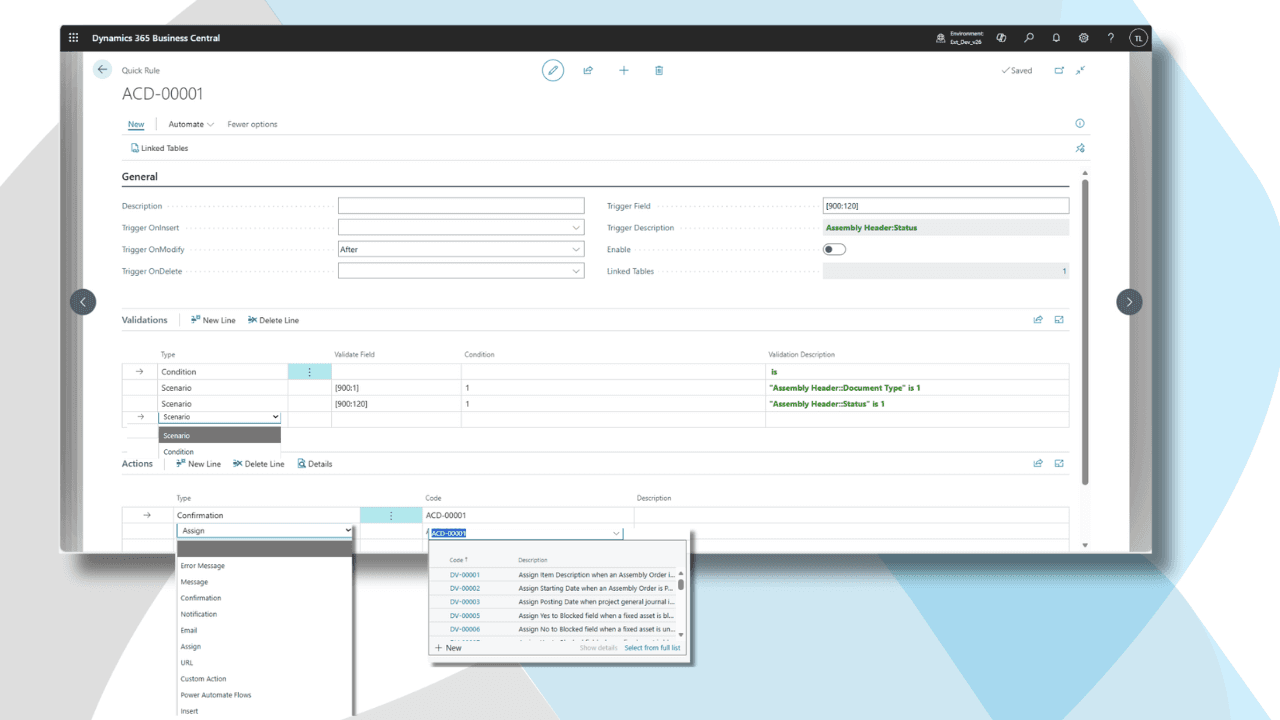
10 powerful action types replace expensive AL development: Error, Message, Confirmation, Notification, Email, Assign, URL, Custom Action, Power Automate, Insert Record
Pricing: $10/user/month – Only users who configure or trigger rules need licenses
✓ Verified Microsoft AppSource Publisher | ✓ Compatible with BC v14-v25 | ✓ 30-Day Money-Back Guarantee
The Automation Challenge Every BC User Faces
Business Central provides excellent standard functionality, but every organization needs custom automation:
● Common automation needs require expensive AL development. Auto-populate salesperson from customer territory. Send automatic emails when orders post. Copy payment terms from customer to documents. Notify Teams when inventory drops below reorder point. Create audit logs when sensitive data changes. Trigger Power Automate flows from BC events. Every automation means developer time and costs.
● Manual processes waste hours daily. Users manually populate fields that could auto-fill based on business logic. Manually send notifications that should trigger automatically. Manually create related records that could generate from rules. Manually enforce policies that should validate automatically. Standard BC lacks automation without coding.
● Development bottlenecks slow business. Simple logic changes require AL coding, testing, deployment—weeks of delay. Business rules change faster than development cycles accommodate. Your team knows what rules should be, but can't implement them without developers. Projects queue up while developers become bottlenecks.
● No visibility into rule execution. Even when custom validation exists in AL code, there's no audit trail. Can't prove which rules fired when, can't troubleshoot why transaction was blocked, can't track automation execution for compliance.
This customization dependency limits Business Central's value. Your business logic trapped in development cycles when it should be configurable by business analysts.
Automate Business Central Without Coding
0-Code Business Rules eliminates the customization bottleneck entirely. Configure sophisticated automation through Business Central pages—no AL development, no Visual Studio, no deployment packages. Just intelligent rules that automate field population, send emails, validate data, and integrate systems in real-time.
Key Benefits:
✓ 10 powerful action types replace common AL customizations
✓ Formula-based conditions use BC's native filter syntax
✓ Combine multiple actions in one rule for complex automation
✓ Transaction-level execution ensures reliability
✓ No coding required – business analysts can configure
✓ Enterprise-grade automation technology
The 10 Action Types:
10 Action Types That Replace AL Customizations
1. Error Message - Block Invalid Transactions
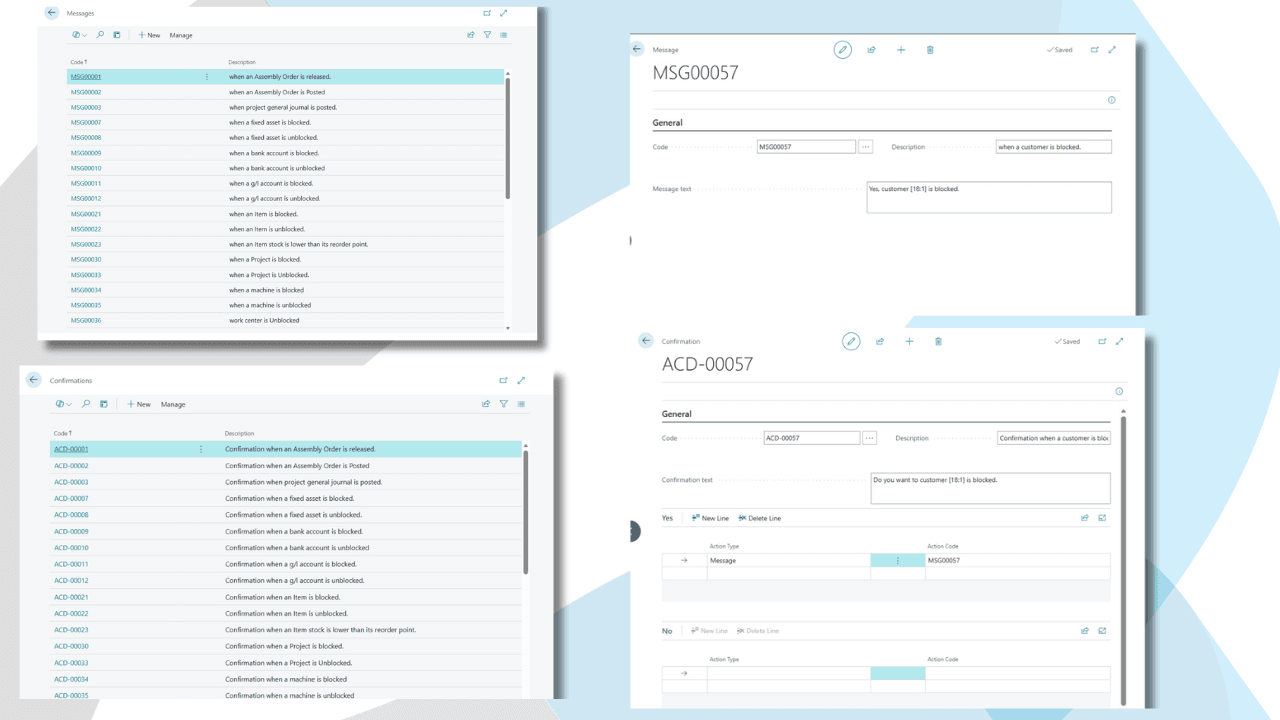
Stop transactions with custom error messages when business rules are violated.
Display clear error explaining why transaction can't proceed: "Cannot delete customer with open orders," "Discount exceeds maximum allowed for your role," "Credit limit exceeded - manager approval required." Transaction blocks, data doesn't save, user sees informative message.
Use cases: Prevent posting before approval, block deletion with dependencies, enforce credit limits, validate discount ranges, require mandatory fields conditionally, prevent duplicate entries.
Example: Block sales order posting if Status = 'Open' with error "Order must be released before posting."
2. Message - Display Informational Alerts
Show non-blocking informational popups to guide users without preventing transactions.
Display helpful reminders, warnings, or confirmations: "This customer has overdue invoices," "Item is below reorder point," "Last purchase price was higher than current entry." Transaction continues after user acknowledges message.
Use cases: Remind about customer notes, warn about inventory levels, inform about price changes, alert about unusual values, display contextual help.
Example: Show message if entering sales price below last purchase cost: "Warning: Price below cost. Verify margin before proceeding."
3. Confirmation - Yes/No Decision Dialogs
Require user decisions with branching logic based on their choice.
Present Yes/No questions, execute different actions based on response: "Credit limit exceeded. Contact manager for approval?" Yes → Send email to manager + set status pending. No → Block transaction. User maintains control with intelligent automation assistance.
Use cases: Approval requests, override permissions, conditional processing, user-driven workflow, exception handling.
Example: If discount > 10%, ask "Manager approval required. Request approval now?" Yes triggers email to manager, No blocks transaction.
4. Notification - Non-Blocking Banner Alerts
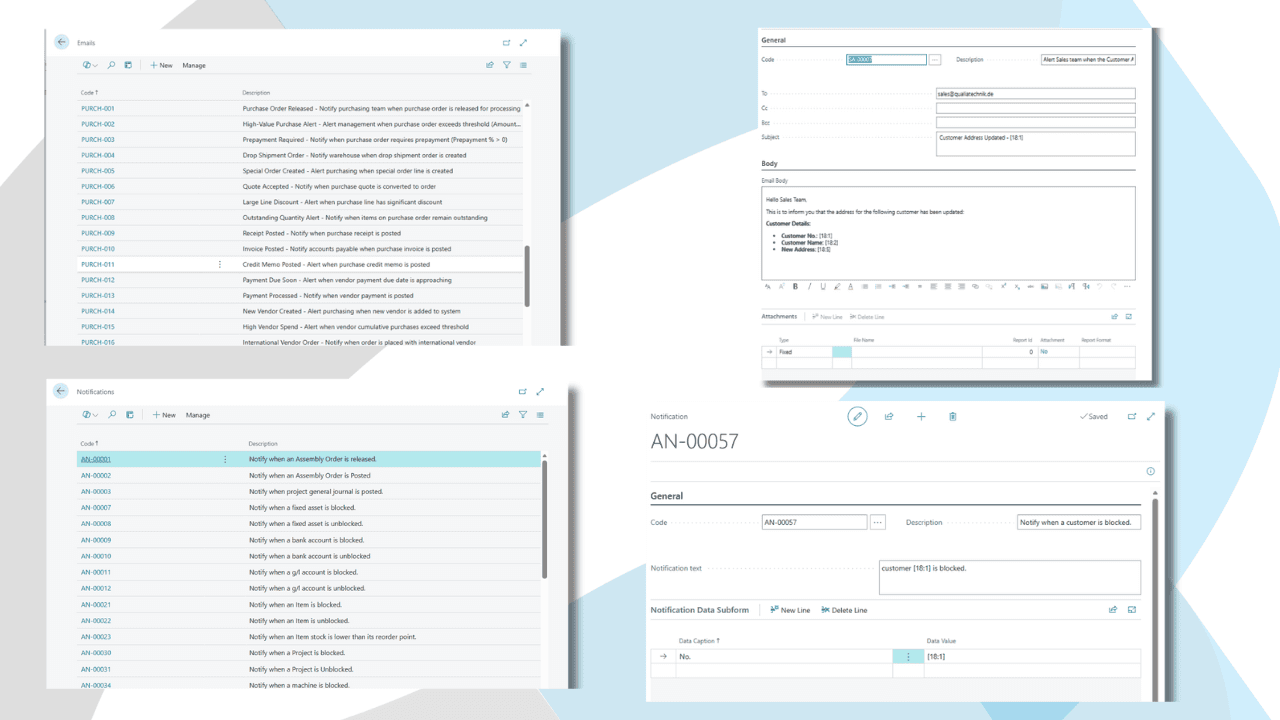
Display banner notifications at top of BC screen without interrupting work.
Subtle, dismissible alerts inform users about background events: "Low stock alert sent to purchasing," "Customer sync to CRM completed," "Automated email sent to vendor." Users stay informed without disruptive popups.
Use cases: Background process confirmation, automation status updates, FYI alerts, multi-user notifications.
Example: When inventory drops below reorder point, show notification "Reorder alert sent to purchasing team for Item XYZ."
5. Email - Automated Email Notifications
Send emails automatically when BC data changes—with report attachments and dynamic content.
Email customers, vendors, managers, teams automatically. Include BC data using placeholders: customer name, order amount, invoice number. Attach BC reports as PDFs. Track email history in validation log.
Use cases: Order confirmations, invoice delivery, payment reminders, approval requests, alert notifications, manager escalations.
Example: When invoice posts, email customer with invoice PDF attached, payment terms, due date—all populated from BC data automatically.
6. Assign - Auto-Populate Field Values
Set field values automatically based on business logic—no manual data entry.
Auto-fill salesperson from customer territory. Copy payment terms from customer to sales order. Set priority based on order amount. Calculate fields from formulas. Populate defaults dynamically based on conditions.
Use cases: Dynamic defaults, copy master data to documents, calculated fields, auto-assignment logic, standardize data entry.
Example: When creating sales order, auto-assign Salesperson Code from Customer."Salesperson Code"—copy salesperson from customer master data to order automatically.
7. URL - Open Web Pages or Applications
Launch URLs automatically from BC events—integrate with external web apps.
Open customer portal when customer selected. Launch mapping app with delivery address. Display product information from manufacturer website. Connect BC to web-based tools seamlessly.
Use cases: External app integration, web portal access, mapping services, product lookups, documentation links.
Example: When viewing customer card, auto-open company website URL stored in customer record for quick reference.
8. Custom Action - Execute AL Codeunits
Trigger custom AL code from business rules—combine no-code rules with coded extensions.
Call your existing AL codeunits from rule triggers. Integrate Business Rules with custom BC extensions. Execute complex logic coded in AL but triggered by rule conditions. Bridge no-code and pro-code development.
Use cases: Complex calculations, legacy code integration, advanced BC operations, custom extension hooks.
Example: Calculate complex commission structure via AL codeunit when sales order amount exceeds threshold.
9. Power Automate - Trigger Cloud Flows
Launch Power Automate flows automatically from BC events—unlimited integration potential.
Connect BC to Teams, SharePoint, CRM, SMS services, social media—500+ cloud apps. Trigger flows based on BC conditions. Extend BC automation to entire Microsoft ecosystem and beyond.
Use cases: Teams notifications, SharePoint document creation, CRM sync, SMS alerts, external system integration.
Example: When high-value order created (Amount > $10,000), trigger Power Automate flow posting to Teams sales channel with order details.
10. Insert Record - Create Related Records Automatically
Generate BC records automatically when events occur—audit trails, log entries, related documents.
Auto-create audit log when sensitive fields change. Generate follow-up tasks when opportunities close. Create default journal lines when documents post. Maintain compliance trails automatically.
Use cases: Audit logging, task generation, related record creation, compliance documentation, automated record keeping.
Example: When customer credit limit changes, auto-insert audit record capturing old value, new value, user, timestamp for compliance trail.
Customizations Without Code: Real Examples
Conditional Mandatory Fields
Challenge: Require "Rejection Reason" field only when sales order status changes to "Rejected"—not mandatory in other scenarios.
Business Rule: IF Status = 'Rejected' AND "Rejection Reason" = '' THEN Error "Rejection reason required for rejected orders"
Result: Field becomes conditionally mandatory based on status. No AL coding needed. Users see clear error if they forget reason. Business policy enforced automatically.
Auto-Assign Values from Related Tables
Challenge: When creating sales order, automatically populate payment terms from customer's default payment terms—eliminate manual lookup.
Business Rule: OnInsert Sales Header → Assign "Payment Terms Code" = Customer."Payment Terms Code"
Result: Every new sales order inherits customer's payment terms automatically. Data consistency guaranteed. Time saved on every order.
Prevent Deletion with Dependencies
Challenge: Block customer deletion if customer has any open sales orders—prevent referential integrity issues.
Business Rule: OnDelete Customer → IF "Open Orders Count" > 0 THEN Error "Cannot delete customer with open orders"
Result: Invalid deletions blocked before database touched. Clear error message explains why. Data integrity protected without coding.
User Role-Based Restrictions
Challenge: Only managers can approve discounts exceeding 10%—sales reps limited to smaller discounts without approval.
Business Rule: OnModify Sales Line → IF "Discount %" > 10 AND User NOT IN 'MANAGERS' THEN Error "Manager approval required for discounts > 10%"
Result: Role-based business policy enforced automatically. Managers can approve any discount. Reps blocked from excessive discounts. No AL code needed.
Duplicate Prevention
Challenge: Prevent duplicate customer email addresses—each email must be unique across all customers.
Business Rule: OnInsert/OnModify Customer → IF Email EXISTS IN Other Customers THEN Error "Email address already in use by another customer"
Result: Database-level duplicate prevention without coding. Clear error on attempted duplicate. Data quality maintained automatically.
Document Release Enforcement
Challenge: Prevent users from manually posting sales orders before they've been formally released through the Release function.
Business Rule: OnPost Sales Order → IF Status = 'Open' THEN Error "Order must be released before posting"
Result: Business policy enforced at transaction level. Users must use Release function before posting. Prevents accidental posting of incomplete orders.
Multi-Action Audit Trail
Challenge: When item unit cost changes, create audit log AND email purchasing manager AND set blocked status.
Business Rule: OnModify Item → IF "Unit Cost" changed THEN Insert Audit Log + Email Manager + Assign Blocked = TRUE
Result: Three actions execute automatically from single trigger. Complete audit trail, manager notification, blocked flag—all without coding.
Cross-Table Validation
Challenge: Validate sales order total doesn't exceed customer's available credit (credit limit minus outstanding balance).
Business Rule: OnInsert Sales Order → IF Amount > (Customer."Credit Limit (LCY)" - Customer."Balance (LCY)") THEN Error "Order exceeds available credit"
Result: Cross-table validation accessing customer data from sales order context. Complex credit checking without AL development.
Dynamic Field Population with Formulas
Challenge: Auto-calculate and populate "Expected Margin %" when sales price and cost are entered.
Business Rule: OnModify Sales Line → IF "Unit Price" > 0 AND "Unit Cost" > 0 THEN Assign "Margin %" = (("Unit Price" - "Unit Cost") / "Unit Price") * 100
Result: Calculated fields populated automatically using formula logic. Real-time margin visibility without manual calculation.
Integration Notification Chain
Challenge: When inventory falls below reorder point, send Teams alert, email purchasing, and create Planner task automatically.
Business Rule: OnModify Item → IF Inventory < "Reorder Point" THEN Power Automate (Teams + Email + Planner) + Notification "Reorder alert sent"
Result: Multi-system integration orchestrated from single BC rule. Teams, email, task management—all triggered automatically by BC inventory change.
Works Everywhere: Universal BC Compatibility
Not just standard tables. Create business rules for any Business Central table or extension.
Compatible with all standard Business Central tables, ISV extension tables, and custom tables or fields you've created. Whether you're using Microsoft's standard functionality, third-party apps, or custom modifications—Business Rules works seamlessly across your entire BC environment.
Automate logic for:
Sales & CRM: Order validation, customer credit checks, quote approval rules, discount policies
Purchasing: Vendor approval, PO limit enforcement, requisition validation, receiving rules
Inventory: Stock level alerts, reorder automation, transfer validation, bin management rules
Finance: Journal posting rules, bank reconciliation validation, payment approval, audit logging
Service: Service order validation, SLA enforcement, technician assignment rules, warranty checks
Manufacturing: Production order validation, capacity checks, material availability rules, quality control
Jobs/Projects: Budget validation, milestone tracking, resource assignment rules, billing approval
Any BC table (standard, ISV, custom), any business logic, any automation scenario—fully compatible.
Seamless Business Central Integration
Business Rules integrates natively with Business Central—no external systems, no middleware, no complexity.
Native BC Extension: Installs from AppSource like any BC app. Uses standard extension framework. Follows Microsoft best practices. Updates automatically with BC releases.
Leverages BC Triggers: Uses Business Central's native OnInsert, OnModify, OnDelete trigger framework. Executes at transaction level before commit. Respects BC transaction boundaries for data consistency.
Honors BC Security: Rules execute within user's security context. Row-level security respected. Role-based permissions enforced. Field-level security maintained.
Data Stays in BC: Rule configuration, validation logs, and audit trails stored in Business Central tables. No external database. Protected by your BC security model and backup procedures.
Works with All BC Deployments: Compatible with Business Central Online (SaaS), on-premises installations, and hybrid environments. Supports BC version 22.0+. Regular updates maintain compatibility with latest BC releases.
Microsoft Ecosystem Integration: Seamlessly integrates with Power Platform (Power Automate flows, Teams notifications), Office 365 services, and Dynamics 365 ecosystem.
Learn more about Business Central development in Microsoft's official documentation.
Getting Started: From Installation to First Business Rule
Step 1: Install from AppSource
Find "0-Code Business Rules" in Microsoft AppSource. Click "Get it now" and complete installation wizard. Standard BC extension—installs in 5-10 minutes.
Step 2: Create Your First Validation Set
Navigate to Business Rules in Business Central. Create new Validation Set for "Sales Order Credit Check." Specify table to monitor (Sales Header), trigger event (OnInsert, OnModify), and when rules should execute (before posting).
Step 3: Define Conditions
Create condition formula using BC filter syntax: Amount > (Customer."Credit Limit" - Customer."Balance (LCY)"). Reference related table (Customer) fields directly. Use familiar BC operators and syntax.
Step 4: Configure Actions
Add Error action with message: "Order amount exceeds available credit. Limit: {Customer.Credit Limit}, Balance: {Customer.Balance}, Available: {Calculated}." Optionally add Email action to notify manager, Notification action to alert user.
Step 5: Test and Activate
Use test mode to validate rule logic. Create test sales order that violates credit limit. Verify error displays, transaction blocks, email sends (if configured). When satisfied, activate the validation set. Your first business rule is live!
From this point forward, credit validation runs automatically. Every sales order checked before saving. Invalid orders blocked with clear error. Managers notified of exceptions. Zero manual credit checking.
Most organizations configure 10-20 business rules in the first month: credit checks, mandatory field validation, duplicate prevention, automatic field population, audit logging, notification automation. Once configured, rules enforce policies forever.
Simple, Transparent Pricing
30-Day Free Trial – Full features. No credit card. No risk.
Per-User Monthly Pricing: $10/user/month
Only configurators need licenses – Users who configure or trigger rules need licenses. End users affected by automation (receiving emails, having orders validated, etc.) don't need licenses.
Unlimited Automations – Configure as many rules as you need. No per-use fees.
Free Updates – Every BC version supported automatically. No upgrade costs.
Email Support Included – Real humans, 24-hour response time.
30-Day Money-Back Guarantee – Not satisfied? Full refund, no questions asked.
Cost Comparison: One AL customization costs $5,000-$15,000 and takes weeks. Business Rules subscription at $10/user/month covers unlimited rules. Build 10, 50, 100 rules—same predictable cost, massive development savings.
Why Choose 0-Code Business Rules
Replace Expensive AL Development
Business analysts configure rules—no developers needed for most business logic.
AL customization costs $5,000-$15,000 per requirement requiring weeks of development time. Business Rules configuration takes hours and costs fraction of development. Build more automation, faster, at lower cost.
Empower business users to implement policy changes themselves. No waiting for developer availability. No deployment cycles. Change business rules as fast as business changes—update conditions, modify actions, add new rules instantly through BC interface.
Comprehensive Automation Platform
Far beyond validation. Business Rules is a complete automation engine for Business Central.
Validation (Error action) is just 1 of 10 action types. The platform handles field automation (Assign), email sending (Email), Teams notifications (Power Automate), audit logging (Insert Record), user interaction (Message/Confirmation/Notification), external integration (URL), and custom code execution (Custom Action). One platform replaces multiple point solutions and dozens of AL customizations.
Combine actions for sophisticated automation: Auto-populate salesperson + Send order confirmation email + Notify Teams channel + Insert audit log = comprehensive business process automation from single rule trigger. Validation is available when needed, but automation is the primary capability.
Enterprise-Grade Reliability
Built on robust automation engine used by hundreds of Business Central customers. Transaction-level execution prevents data inconsistency. Comprehensive logging enables audit compliance and troubleshooting.
Automatic retry logic handles temporary issues. Error tracking identifies rule failures immediately. Performance optimized for high-volume transaction processing. Battle-tested in demanding production environments.
Formula-Based Simplicity
No programming required, yet powerful enough for complex scenarios.
Use BC's standard filter syntax you already know. If you can filter customer lists or create report filters in BC, you can create business rule conditions. Familiar tools, familiar syntax, immediate productivity.
But simple doesn't mean limited: Cross-table validation, complex AND/OR logic, formula calculations, user role checking, date comparisons—enterprise capabilities accessible to business analysts.
Complete Visibility & Audit Trail
Every rule execution logged with full details.
See exactly which rules fired, when, for which records, with what results. Track validation failures, action executions, email sends, field changes. Prove compliance for audits. Troubleshoot issues rapidly with complete execution history.
Validation log shows: Timestamp, Table/Record, User, Condition Result (True/False), Actions Executed, Errors/Messages, Email Recipients, Fields Modified. Comprehensive documentation of all automation activity.
Dedicated BC Expertise
The 0-Code support team knows Business Central table structures, trigger framework, and business processes deeply. We speak your language—tables, fields, posting routines, validation scenarios.
Regular updates maintain compatibility with latest BC versions. We monitor Microsoft BC roadmap and test thoroughly before each release. Your business rules keep working as BC evolves.
Value That Scales
Start with one rule, expand to hundreds. Pricing scales with usage. ROI typically realized within first month through eliminated development costs, prevented errors, and improved data quality.
Cost comparison: One AL customization costs $5,000-$15,000. Business Rules subscription covers unlimited rules across all scenarios. Build 10, 50, 100 rules—same predictable monthly cost, massive development savings.
Ready to Automate Your Business Logic?
Stop expensive AL customizations and data entry errors. Configure sophisticated business logic through Business Central pages—validate, automate, notify, integrate using 10 powerful action types.
Join hundreds of BC users who've eliminated customization costs and improved data quality through intelligent business rule automation.
Start Free Trial
30 days. Full features. No credit card. $10/user/month after trial.
Schedule a Live Demo
See business rule automation in action. 30-minute personalized demo showing your specific validation and automation scenarios.
Questions?
Talk to our Business Central automation specialists. We'll help you identify rule automation opportunities and estimate development cost savings.
0-Code Business Central Business Rules | 10 action types replace AL customizations | Validate, automate, notify without coding | $10/user/month | Start free trial today
Business Rules • Advanced Work Flow • Email Automation • Power Automate Connector
Documentation • Support • Privacy • Terms
© 2026 Qualia Technik. Microsoft, Dynamics 365, Business Central are trademarks of Microsoft Corporation.
Replace AL customizations with configurable automation. The 0-Code Business Rules engine transforms Business Central into an intelligent automation platform—auto-populating fields, sending emails, integrating systems, validating data, and enforcing policies without coding. 10 powerful action types replace expensive AL development. Automate field assignment, send notifications, block errors, trigger Power Automate, and create audit trails using simple rule configuration.
Business Rules for D365 Business Central
Complete Business Rules Management System (BRMS) for D365 Business Central
Replace AL customizations with configurable automation. The 0-Code Business Rules engine transforms Business Central into an intelligent automation platform—auto-populating fields, sending emails, integrating systems, validating data, and enforcing policies without coding.
10 powerful action types replace expensive AL development: Error, Message, Confirmation, Notification, Email, Assign, URL, Custom Action, Power Automate, Insert Record
Pricing: $10/user/month – Only users who configure or trigger rules need licenses
✓ Verified Microsoft AppSource Publisher | ✓ Compatible with BC v14-v25 | ✓ 30-Day Money-Back Guarantee
The Automation Challenge Every BC User Faces
Business Central provides excellent standard functionality, but every organization needs custom automation:
● Common automation needs require expensive AL development. Auto-populate salesperson from customer territory. Send automatic emails when orders post. Copy payment terms from customer to documents. Notify Teams when inventory drops below reorder point. Create audit logs when sensitive data changes. Trigger Power Automate flows from BC events. Every automation means developer time and costs.
● Manual processes waste hours daily. Users manually populate fields that could auto-fill based on business logic. Manually send notifications that should trigger automatically. Manually create related records that could generate from rules. Manually enforce policies that should validate automatically. Standard BC lacks automation without coding.
● Development bottlenecks slow business. Simple logic changes require AL coding, testing, deployment—weeks of delay. Business rules change faster than development cycles accommodate. Your team knows what rules should be, but can't implement them without developers. Projects queue up while developers become bottlenecks.
● No visibility into rule execution. Even when custom validation exists in AL code, there's no audit trail. Can't prove which rules fired when, can't troubleshoot why transaction was blocked, can't track automation execution for compliance.
This customization dependency limits Business Central's value. Your business logic trapped in development cycles when it should be configurable by business analysts.
Automate Business Central Without Coding
0-Code Business Rules eliminates the customization bottleneck entirely. Configure sophisticated automation through Business Central pages—no AL development, no Visual Studio, no deployment packages. Just intelligent rules that automate field population, send emails, validate data, and integrate systems in real-time.
Key Benefits:
✓ 10 powerful action types replace common AL customizations
✓ Formula-based conditions use BC's native filter syntax
✓ Combine multiple actions in one rule for complex automation
✓ Transaction-level execution ensures reliability
✓ No coding required – business analysts can configure
✓ Enterprise-grade automation technology
The 10 Action Types:
10 Action Types That Replace AL Customizations
1. Error Message - Block Invalid Transactions
Stop transactions with custom error messages when business rules are violated.
Display clear error explaining why transaction can't proceed: "Cannot delete customer with open orders," "Discount exceeds maximum allowed for your role," "Credit limit exceeded - manager approval required." Transaction blocks, data doesn't save, user sees informative message.
Use cases: Prevent posting before approval, block deletion with dependencies, enforce credit limits, validate discount ranges, require mandatory fields conditionally, prevent duplicate entries.
Example: Block sales order posting if Status = 'Open' with error "Order must be released before posting."
2. Message - Display Informational Alerts
Show non-blocking informational popups to guide users without preventing transactions.
Display helpful reminders, warnings, or confirmations: "This customer has overdue invoices," "Item is below reorder point," "Last purchase price was higher than current entry." Transaction continues after user acknowledges message.
Use cases: Remind about customer notes, warn about inventory levels, inform about price changes, alert about unusual values, display contextual help.
Example: Show message if entering sales price below last purchase cost: "Warning: Price below cost. Verify margin before proceeding."
3. Confirmation - Yes/No Decision Dialogs
Require user decisions with branching logic based on their choice.
Present Yes/No questions, execute different actions based on response: "Credit limit exceeded. Contact manager for approval?" Yes → Send email to manager + set status pending. No → Block transaction. User maintains control with intelligent automation assistance.
Use cases: Approval requests, override permissions, conditional processing, user-driven workflow, exception handling.
Example: If discount > 10%, ask "Manager approval required. Request approval now?" Yes triggers email to manager, No blocks transaction.
4. Notification - Non-Blocking Banner Alerts
Display banner notifications at top of BC screen without interrupting work.
Subtle, dismissible alerts inform users about background events: "Low stock alert sent to purchasing," "Customer sync to CRM completed," "Automated email sent to vendor." Users stay informed without disruptive popups.
Use cases: Background process confirmation, automation status updates, FYI alerts, multi-user notifications.
Example: When inventory drops below reorder point, show notification "Reorder alert sent to purchasing team for Item XYZ."
5. Email - Automated Email Notifications
Send emails automatically when BC data changes—with report attachments and dynamic content.
Email customers, vendors, managers, teams automatically. Include BC data using placeholders: customer name, order amount, invoice number. Attach BC reports as PDFs. Track email history in validation log.
Use cases: Order confirmations, invoice delivery, payment reminders, approval requests, alert notifications, manager escalations.
Example: When invoice posts, email customer with invoice PDF attached, payment terms, due date—all populated from BC data automatically.
6. Assign - Auto-Populate Field Values
Set field values automatically based on business logic—no manual data entry.
Auto-fill salesperson from customer territory. Copy payment terms from customer to sales order. Set priority based on order amount. Calculate fields from formulas. Populate defaults dynamically based on conditions.
Use cases: Dynamic defaults, copy master data to documents, calculated fields, auto-assignment logic, standardize data entry.
Example: When creating sales order, auto-assign Salesperson Code from Customer."Salesperson Code"—copy salesperson from customer master data to order automatically.
7. URL - Open Web Pages or Applications
Launch URLs automatically from BC events—integrate with external web apps.
Open customer portal when customer selected. Launch mapping app with delivery address. Display product information from manufacturer website. Connect BC to web-based tools seamlessly.
Use cases: External app integration, web portal access, mapping services, product lookups, documentation links.
Example: When viewing customer card, auto-open company website URL stored in customer record for quick reference.
8. Custom Action - Execute AL Codeunits
Trigger custom AL code from business rules—combine no-code rules with coded extensions.
Call your existing AL codeunits from rule triggers. Integrate Business Rules with custom BC extensions. Execute complex logic coded in AL but triggered by rule conditions. Bridge no-code and pro-code development.
Use cases: Complex calculations, legacy code integration, advanced BC operations, custom extension hooks.
Example: Calculate complex commission structure via AL codeunit when sales order amount exceeds threshold.
9. Power Automate - Trigger Cloud Flows
Launch Power Automate flows automatically from BC events—unlimited integration potential.
Connect BC to Teams, SharePoint, CRM, SMS services, social media—500+ cloud apps. Trigger flows based on BC conditions. Extend BC automation to entire Microsoft ecosystem and beyond.
Use cases: Teams notifications, SharePoint document creation, CRM sync, SMS alerts, external system integration.
Example: When high-value order created (Amount > $10,000), trigger Power Automate flow posting to Teams sales channel with order details.
10. Insert Record - Create Related Records Automatically
Generate BC records automatically when events occur—audit trails, log entries, related documents.
Auto-create audit log when sensitive fields change. Generate follow-up tasks when opportunities close. Create default journal lines when documents post. Maintain compliance trails automatically.
Use cases: Audit logging, task generation, related record creation, compliance documentation, automated record keeping.
Example: When customer credit limit changes, auto-insert audit record capturing old value, new value, user, timestamp for compliance trail.
Customizations Without Code: Real Examples
Conditional Mandatory Fields
Challenge: Require "Rejection Reason" field only when sales order status changes to "Rejected"—not mandatory in other scenarios.
Business Rule: IF Status = 'Rejected' AND "Rejection Reason" = '' THEN Error "Rejection reason required for rejected orders"
Result: Field becomes conditionally mandatory based on status. No AL coding needed. Users see clear error if they forget reason. Business policy enforced automatically.
Auto-Assign Values from Related Tables
Challenge: When creating sales order, automatically populate payment terms from customer's default payment terms—eliminate manual lookup.
Business Rule: OnInsert Sales Header → Assign "Payment Terms Code" = Customer."Payment Terms Code"
Result: Every new sales order inherits customer's payment terms automatically. Data consistency guaranteed. Time saved on every order.
Prevent Deletion with Dependencies
Challenge: Block customer deletion if customer has any open sales orders—prevent referential integrity issues.
Business Rule: OnDelete Customer → IF "Open Orders Count" > 0 THEN Error "Cannot delete customer with open orders"
Result: Invalid deletions blocked before database touched. Clear error message explains why. Data integrity protected without coding.
User Role-Based Restrictions
Challenge: Only managers can approve discounts exceeding 10%—sales reps limited to smaller discounts without approval.
Business Rule: OnModify Sales Line → IF "Discount %" > 10 AND User NOT IN 'MANAGERS' THEN Error "Manager approval required for discounts > 10%"
Result: Role-based business policy enforced automatically. Managers can approve any discount. Reps blocked from excessive discounts. No AL code needed.
Duplicate Prevention
Challenge: Prevent duplicate customer email addresses—each email must be unique across all customers.
Business Rule: OnInsert/OnModify Customer → IF Email EXISTS IN Other Customers THEN Error "Email address already in use by another customer"
Result: Database-level duplicate prevention without coding. Clear error on attempted duplicate. Data quality maintained automatically.
Document Release Enforcement
Challenge: Prevent users from manually posting sales orders before they've been formally released through the Release function.
Business Rule: OnPost Sales Order → IF Status = 'Open' THEN Error "Order must be released before posting"
Result: Business policy enforced at transaction level. Users must use Release function before posting. Prevents accidental posting of incomplete orders.
Multi-Action Audit Trail
Challenge: When item unit cost changes, create audit log AND email purchasing manager AND set blocked status.
Business Rule: OnModify Item → IF "Unit Cost" changed THEN Insert Audit Log + Email Manager + Assign Blocked = TRUE
Result: Three actions execute automatically from single trigger. Complete audit trail, manager notification, blocked flag—all without coding.
Cross-Table Validation
Challenge: Validate sales order total doesn't exceed customer's available credit (credit limit minus outstanding balance).
Business Rule: OnInsert Sales Order → IF Amount > (Customer."Credit Limit (LCY)" - Customer."Balance (LCY)") THEN Error "Order exceeds available credit"
Result: Cross-table validation accessing customer data from sales order context. Complex credit checking without AL development.
Dynamic Field Population with Formulas
Challenge: Auto-calculate and populate "Expected Margin %" when sales price and cost are entered.
Business Rule: OnModify Sales Line → IF "Unit Price" > 0 AND "Unit Cost" > 0 THEN Assign "Margin %" = (("Unit Price" - "Unit Cost") / "Unit Price") * 100
Result: Calculated fields populated automatically using formula logic. Real-time margin visibility without manual calculation.
Integration Notification Chain
Challenge: When inventory falls below reorder point, send Teams alert, email purchasing, and create Planner task automatically.
Business Rule: OnModify Item → IF Inventory < "Reorder Point" THEN Power Automate (Teams + Email + Planner) + Notification "Reorder alert sent"
Result: Multi-system integration orchestrated from single BC rule. Teams, email, task management—all triggered automatically by BC inventory change.
Works Everywhere: Universal BC Compatibility
Not just standard tables. Create business rules for any Business Central table or extension.
Compatible with all standard Business Central tables, ISV extension tables, and custom tables or fields you've created. Whether you're using Microsoft's standard functionality, third-party apps, or custom modifications—Business Rules works seamlessly across your entire BC environment.
Automate logic for:
Sales & CRM: Order validation, customer credit checks, quote approval rules, discount policies
Purchasing: Vendor approval, PO limit enforcement, requisition validation, receiving rules
Inventory: Stock level alerts, reorder automation, transfer validation, bin management rules
Finance: Journal posting rules, bank reconciliation validation, payment approval, audit logging
Service: Service order validation, SLA enforcement, technician assignment rules, warranty checks
Manufacturing: Production order validation, capacity checks, material availability rules, quality control
Jobs/Projects: Budget validation, milestone tracking, resource assignment rules, billing approval
Any BC table (standard, ISV, custom), any business logic, any automation scenario—fully compatible.
Seamless Business Central Integration
Business Rules integrates natively with Business Central—no external systems, no middleware, no complexity.
Native BC Extension: Installs from AppSource like any BC app. Uses standard extension framework. Follows Microsoft best practices. Updates automatically with BC releases.
Leverages BC Triggers: Uses Business Central's native OnInsert, OnModify, OnDelete trigger framework. Executes at transaction level before commit. Respects BC transaction boundaries for data consistency.
Honors BC Security: Rules execute within user's security context. Row-level security respected. Role-based permissions enforced. Field-level security maintained.
Data Stays in BC: Rule configuration, validation logs, and audit trails stored in Business Central tables. No external database. Protected by your BC security model and backup procedures.
Works with All BC Deployments: Compatible with Business Central Online (SaaS), on-premises installations, and hybrid environments. Supports BC version 22.0+. Regular updates maintain compatibility with latest BC releases.
Microsoft Ecosystem Integration: Seamlessly integrates with Power Platform (Power Automate flows, Teams notifications), Office 365 services, and Dynamics 365 ecosystem.
Learn more about Business Central development in Microsoft's official documentation.
Getting Started: From Installation to First Business Rule
Step 1: Install from AppSource
Find "0-Code Business Rules" in Microsoft AppSource. Click "Get it now" and complete installation wizard. Standard BC extension—installs in 5-10 minutes.
Step 2: Create Your First Validation Set
Navigate to Business Rules in Business Central. Create new Validation Set for "Sales Order Credit Check." Specify table to monitor (Sales Header), trigger event (OnInsert, OnModify), and when rules should execute (before posting).
Step 3: Define Conditions
Create condition formula using BC filter syntax: Amount > (Customer."Credit Limit" - Customer."Balance (LCY)"). Reference related table (Customer) fields directly. Use familiar BC operators and syntax.
Step 4: Configure Actions
Add Error action with message: "Order amount exceeds available credit. Limit: {Customer.Credit Limit}, Balance: {Customer.Balance}, Available: {Calculated}." Optionally add Email action to notify manager, Notification action to alert user.
Step 5: Test and Activate
Use test mode to validate rule logic. Create test sales order that violates credit limit. Verify error displays, transaction blocks, email sends (if configured). When satisfied, activate the validation set. Your first business rule is live!
From this point forward, credit validation runs automatically. Every sales order checked before saving. Invalid orders blocked with clear error. Managers notified of exceptions. Zero manual credit checking.
Most organizations configure 10-20 business rules in the first month: credit checks, mandatory field validation, duplicate prevention, automatic field population, audit logging, notification automation. Once configured, rules enforce policies forever.
Simple, Transparent Pricing
30-Day Free Trial – Full features. No credit card. No risk.
Per-User Monthly Pricing: $10/user/month
Only configurators need licenses – Users who configure or trigger rules need licenses. End users affected by automation (receiving emails, having orders validated, etc.) don't need licenses.
Unlimited Automations – Configure as many rules as you need. No per-use fees.
Free Updates – Every BC version supported automatically. No upgrade costs.
Email Support Included – Real humans, 24-hour response time.
30-Day Money-Back Guarantee – Not satisfied? Full refund, no questions asked.
Cost Comparison: One AL customization costs $5,000-$15,000 and takes weeks. Business Rules subscription at $10/user/month covers unlimited rules. Build 10, 50, 100 rules—same predictable cost, massive development savings.
Why Choose 0-Code Business Rules
Replace Expensive AL Development
Business analysts configure rules—no developers needed for most business logic.
AL customization costs $5,000-$15,000 per requirement requiring weeks of development time. Business Rules configuration takes hours and costs fraction of development. Build more automation, faster, at lower cost.
Empower business users to implement policy changes themselves. No waiting for developer availability. No deployment cycles. Change business rules as fast as business changes—update conditions, modify actions, add new rules instantly through BC interface.
Comprehensive Automation Platform
Far beyond validation. Business Rules is a complete automation engine for Business Central.
Validation (Error action) is just 1 of 10 action types. The platform handles field automation (Assign), email sending (Email), Teams notifications (Power Automate), audit logging (Insert Record), user interaction (Message/Confirmation/Notification), external integration (URL), and custom code execution (Custom Action). One platform replaces multiple point solutions and dozens of AL customizations.
Combine actions for sophisticated automation: Auto-populate salesperson + Send order confirmation email + Notify Teams channel + Insert audit log = comprehensive business process automation from single rule trigger. Validation is available when needed, but automation is the primary capability.
Enterprise-Grade Reliability
Built on robust automation engine used by hundreds of Business Central customers. Transaction-level execution prevents data inconsistency. Comprehensive logging enables audit compliance and troubleshooting.
Automatic retry logic handles temporary issues. Error tracking identifies rule failures immediately. Performance optimized for high-volume transaction processing. Battle-tested in demanding production environments.
Formula-Based Simplicity
No programming required, yet powerful enough for complex scenarios.
Use BC's standard filter syntax you already know. If you can filter customer lists or create report filters in BC, you can create business rule conditions. Familiar tools, familiar syntax, immediate productivity.
But simple doesn't mean limited: Cross-table validation, complex AND/OR logic, formula calculations, user role checking, date comparisons—enterprise capabilities accessible to business analysts.
Complete Visibility & Audit Trail
Every rule execution logged with full details.
See exactly which rules fired, when, for which records, with what results. Track validation failures, action executions, email sends, field changes. Prove compliance for audits. Troubleshoot issues rapidly with complete execution history.
Validation log shows: Timestamp, Table/Record, User, Condition Result (True/False), Actions Executed, Errors/Messages, Email Recipients, Fields Modified. Comprehensive documentation of all automation activity.
Dedicated BC Expertise
The 0-Code support team knows Business Central table structures, trigger framework, and business processes deeply. We speak your language—tables, fields, posting routines, validation scenarios.
Regular updates maintain compatibility with latest BC versions. We monitor Microsoft BC roadmap and test thoroughly before each release. Your business rules keep working as BC evolves.
Value That Scales
Start with one rule, expand to hundreds. Pricing scales with usage. ROI typically realized within first month through eliminated development costs, prevented errors, and improved data quality.
Cost comparison: One AL customization costs $5,000-$15,000. Business Rules subscription covers unlimited rules across all scenarios. Build 10, 50, 100 rules—same predictable monthly cost, massive development savings.
Ready to Automate Your Business Logic?
Stop expensive AL customizations and data entry errors. Configure sophisticated business logic through Business Central pages—validate, automate, notify, integrate using 10 powerful action types.
Join hundreds of BC users who've eliminated customization costs and improved data quality through intelligent business rule automation.
Start Free Trial
30 days. Full features. No credit card. $10/user/month after trial.
Schedule a Live Demo
See business rule automation in action. 30-minute personalized demo showing your specific validation and automation scenarios.
Questions?
Talk to our Business Central automation specialists. We'll help you identify rule automation opportunities and estimate development cost savings.
0-Code Business Central Business Rules | 10 action types replace AL customizations | Validate, automate, notify without coding | $10/user/month | Start free trial today
Business Rules • Advanced Work Flow • Email Automation • Power Automate Connector
Documentation • Support • Privacy • Terms
© 2026 Qualia Technik. Microsoft, Dynamics 365, Business Central are trademarks of Microsoft Corporation.
Replace AL customizations with configurable automation. The 0-Code Business Rules engine transforms Business Central into an intelligent automation platform—auto-populating fields, sending emails, integrating systems, validating data, and enforcing policies without coding. 10 powerful action types replace expensive AL development. Automate field assignment, send notifications, block errors, trigger Power Automate, and create audit trails using simple rule configuration.
Business Rules for D365 Business Central
Complete Business Rules Management System (BRMS) for D365 Business Central
Replace AL customizations with configurable automation. The 0-Code Business Rules engine transforms Business Central into an intelligent automation platform—auto-populating fields, sending emails, integrating systems, validating data, and enforcing policies without coding.
10 powerful action types replace expensive AL development: Error, Message, Confirmation, Notification, Email, Assign, URL, Custom Action, Power Automate, Insert Record
Pricing: $10/user/month – Only users who configure or trigger rules need licenses
✓ Verified Microsoft AppSource Publisher | ✓ Compatible with BC v14-v25 | ✓ 30-Day Money-Back Guarantee
The Automation Challenge Every BC User Faces
Business Central provides excellent standard functionality, but every organization needs custom automation:
● Common automation needs require expensive AL development. Auto-populate salesperson from customer territory. Send automatic emails when orders post. Copy payment terms from customer to documents. Notify Teams when inventory drops below reorder point. Create audit logs when sensitive data changes. Trigger Power Automate flows from BC events. Every automation means developer time and costs.
● Manual processes waste hours daily. Users manually populate fields that could auto-fill based on business logic. Manually send notifications that should trigger automatically. Manually create related records that could generate from rules. Manually enforce policies that should validate automatically. Standard BC lacks automation without coding.
● Development bottlenecks slow business. Simple logic changes require AL coding, testing, deployment—weeks of delay. Business rules change faster than development cycles accommodate. Your team knows what rules should be, but can't implement them without developers. Projects queue up while developers become bottlenecks.
● No visibility into rule execution. Even when custom validation exists in AL code, there's no audit trail. Can't prove which rules fired when, can't troubleshoot why transaction was blocked, can't track automation execution for compliance.
This customization dependency limits Business Central's value. Your business logic trapped in development cycles when it should be configurable by business analysts.
Automate Business Central Without Coding
0-Code Business Rules eliminates the customization bottleneck entirely. Configure sophisticated automation through Business Central pages—no AL development, no Visual Studio, no deployment packages. Just intelligent rules that automate field population, send emails, validate data, and integrate systems in real-time.
Key Benefits:
✓ 10 powerful action types replace common AL customizations
✓ Formula-based conditions use BC's native filter syntax
✓ Combine multiple actions in one rule for complex automation
✓ Transaction-level execution ensures reliability
✓ No coding required – business analysts can configure
✓ Enterprise-grade automation technology
The 10 Action Types:
10 Action Types That Replace AL Customizations
1. Error Message - Block Invalid Transactions
Stop transactions with custom error messages when business rules are violated.
Display clear error explaining why transaction can't proceed: "Cannot delete customer with open orders," "Discount exceeds maximum allowed for your role," "Credit limit exceeded - manager approval required." Transaction blocks, data doesn't save, user sees informative message.
Use cases: Prevent posting before approval, block deletion with dependencies, enforce credit limits, validate discount ranges, require mandatory fields conditionally, prevent duplicate entries.
Example: Block sales order posting if Status = 'Open' with error "Order must be released before posting."
2. Message - Display Informational Alerts
Show non-blocking informational popups to guide users without preventing transactions.
Display helpful reminders, warnings, or confirmations: "This customer has overdue invoices," "Item is below reorder point," "Last purchase price was higher than current entry." Transaction continues after user acknowledges message.
Use cases: Remind about customer notes, warn about inventory levels, inform about price changes, alert about unusual values, display contextual help.
Example: Show message if entering sales price below last purchase cost: "Warning: Price below cost. Verify margin before proceeding."
3. Confirmation - Yes/No Decision Dialogs
Require user decisions with branching logic based on their choice.
Present Yes/No questions, execute different actions based on response: "Credit limit exceeded. Contact manager for approval?" Yes → Send email to manager + set status pending. No → Block transaction. User maintains control with intelligent automation assistance.
Use cases: Approval requests, override permissions, conditional processing, user-driven workflow, exception handling.
Example: If discount > 10%, ask "Manager approval required. Request approval now?" Yes triggers email to manager, No blocks transaction.
4. Notification - Non-Blocking Banner Alerts
Display banner notifications at top of BC screen without interrupting work.
Subtle, dismissible alerts inform users about background events: "Low stock alert sent to purchasing," "Customer sync to CRM completed," "Automated email sent to vendor." Users stay informed without disruptive popups.
Use cases: Background process confirmation, automation status updates, FYI alerts, multi-user notifications.
Example: When inventory drops below reorder point, show notification "Reorder alert sent to purchasing team for Item XYZ."
5. Email - Automated Email Notifications
Send emails automatically when BC data changes—with report attachments and dynamic content.
Email customers, vendors, managers, teams automatically. Include BC data using placeholders: customer name, order amount, invoice number. Attach BC reports as PDFs. Track email history in validation log.
Use cases: Order confirmations, invoice delivery, payment reminders, approval requests, alert notifications, manager escalations.
Example: When invoice posts, email customer with invoice PDF attached, payment terms, due date—all populated from BC data automatically.
6. Assign - Auto-Populate Field Values
Set field values automatically based on business logic—no manual data entry.
Auto-fill salesperson from customer territory. Copy payment terms from customer to sales order. Set priority based on order amount. Calculate fields from formulas. Populate defaults dynamically based on conditions.
Use cases: Dynamic defaults, copy master data to documents, calculated fields, auto-assignment logic, standardize data entry.
Example: When creating sales order, auto-assign Salesperson Code from Customer."Salesperson Code"—copy salesperson from customer master data to order automatically.
7. URL - Open Web Pages or Applications
Launch URLs automatically from BC events—integrate with external web apps.
Open customer portal when customer selected. Launch mapping app with delivery address. Display product information from manufacturer website. Connect BC to web-based tools seamlessly.
Use cases: External app integration, web portal access, mapping services, product lookups, documentation links.
Example: When viewing customer card, auto-open company website URL stored in customer record for quick reference.
8. Custom Action - Execute AL Codeunits
Trigger custom AL code from business rules—combine no-code rules with coded extensions.
Call your existing AL codeunits from rule triggers. Integrate Business Rules with custom BC extensions. Execute complex logic coded in AL but triggered by rule conditions. Bridge no-code and pro-code development.
Use cases: Complex calculations, legacy code integration, advanced BC operations, custom extension hooks.
Example: Calculate complex commission structure via AL codeunit when sales order amount exceeds threshold.
9. Power Automate - Trigger Cloud Flows
Launch Power Automate flows automatically from BC events—unlimited integration potential.
Connect BC to Teams, SharePoint, CRM, SMS services, social media—500+ cloud apps. Trigger flows based on BC conditions. Extend BC automation to entire Microsoft ecosystem and beyond.
Use cases: Teams notifications, SharePoint document creation, CRM sync, SMS alerts, external system integration.
Example: When high-value order created (Amount > $10,000), trigger Power Automate flow posting to Teams sales channel with order details.
10. Insert Record - Create Related Records Automatically
Generate BC records automatically when events occur—audit trails, log entries, related documents.
Auto-create audit log when sensitive fields change. Generate follow-up tasks when opportunities close. Create default journal lines when documents post. Maintain compliance trails automatically.
Use cases: Audit logging, task generation, related record creation, compliance documentation, automated record keeping.
Example: When customer credit limit changes, auto-insert audit record capturing old value, new value, user, timestamp for compliance trail.
Customizations Without Code: Real Examples
Conditional Mandatory Fields
Challenge: Require "Rejection Reason" field only when sales order status changes to "Rejected"—not mandatory in other scenarios.
Business Rule: IF Status = 'Rejected' AND "Rejection Reason" = '' THEN Error "Rejection reason required for rejected orders"
Result: Field becomes conditionally mandatory based on status. No AL coding needed. Users see clear error if they forget reason. Business policy enforced automatically.
Auto-Assign Values from Related Tables
Challenge: When creating sales order, automatically populate payment terms from customer's default payment terms—eliminate manual lookup.
Business Rule: OnInsert Sales Header → Assign "Payment Terms Code" = Customer."Payment Terms Code"
Result: Every new sales order inherits customer's payment terms automatically. Data consistency guaranteed. Time saved on every order.
Prevent Deletion with Dependencies
Challenge: Block customer deletion if customer has any open sales orders—prevent referential integrity issues.
Business Rule: OnDelete Customer → IF "Open Orders Count" > 0 THEN Error "Cannot delete customer with open orders"
Result: Invalid deletions blocked before database touched. Clear error message explains why. Data integrity protected without coding.
User Role-Based Restrictions
Challenge: Only managers can approve discounts exceeding 10%—sales reps limited to smaller discounts without approval.
Business Rule: OnModify Sales Line → IF "Discount %" > 10 AND User NOT IN 'MANAGERS' THEN Error "Manager approval required for discounts > 10%"
Result: Role-based business policy enforced automatically. Managers can approve any discount. Reps blocked from excessive discounts. No AL code needed.
Duplicate Prevention
Challenge: Prevent duplicate customer email addresses—each email must be unique across all customers.
Business Rule: OnInsert/OnModify Customer → IF Email EXISTS IN Other Customers THEN Error "Email address already in use by another customer"
Result: Database-level duplicate prevention without coding. Clear error on attempted duplicate. Data quality maintained automatically.
Document Release Enforcement
Challenge: Prevent users from manually posting sales orders before they've been formally released through the Release function.
Business Rule: OnPost Sales Order → IF Status = 'Open' THEN Error "Order must be released before posting"
Result: Business policy enforced at transaction level. Users must use Release function before posting. Prevents accidental posting of incomplete orders.
Multi-Action Audit Trail
Challenge: When item unit cost changes, create audit log AND email purchasing manager AND set blocked status.
Business Rule: OnModify Item → IF "Unit Cost" changed THEN Insert Audit Log + Email Manager + Assign Blocked = TRUE
Result: Three actions execute automatically from single trigger. Complete audit trail, manager notification, blocked flag—all without coding.
Cross-Table Validation
Challenge: Validate sales order total doesn't exceed customer's available credit (credit limit minus outstanding balance).
Business Rule: OnInsert Sales Order → IF Amount > (Customer."Credit Limit (LCY)" - Customer."Balance (LCY)") THEN Error "Order exceeds available credit"
Result: Cross-table validation accessing customer data from sales order context. Complex credit checking without AL development.
Dynamic Field Population with Formulas
Challenge: Auto-calculate and populate "Expected Margin %" when sales price and cost are entered.
Business Rule: OnModify Sales Line → IF "Unit Price" > 0 AND "Unit Cost" > 0 THEN Assign "Margin %" = (("Unit Price" - "Unit Cost") / "Unit Price") * 100
Result: Calculated fields populated automatically using formula logic. Real-time margin visibility without manual calculation.
Integration Notification Chain
Challenge: When inventory falls below reorder point, send Teams alert, email purchasing, and create Planner task automatically.
Business Rule: OnModify Item → IF Inventory < "Reorder Point" THEN Power Automate (Teams + Email + Planner) + Notification "Reorder alert sent"
Result: Multi-system integration orchestrated from single BC rule. Teams, email, task management—all triggered automatically by BC inventory change.
Works Everywhere: Universal BC Compatibility
Not just standard tables. Create business rules for any Business Central table or extension.
Compatible with all standard Business Central tables, ISV extension tables, and custom tables or fields you've created. Whether you're using Microsoft's standard functionality, third-party apps, or custom modifications—Business Rules works seamlessly across your entire BC environment.
Automate logic for:
Sales & CRM: Order validation, customer credit checks, quote approval rules, discount policies
Purchasing: Vendor approval, PO limit enforcement, requisition validation, receiving rules
Inventory: Stock level alerts, reorder automation, transfer validation, bin management rules
Finance: Journal posting rules, bank reconciliation validation, payment approval, audit logging
Service: Service order validation, SLA enforcement, technician assignment rules, warranty checks
Manufacturing: Production order validation, capacity checks, material availability rules, quality control
Jobs/Projects: Budget validation, milestone tracking, resource assignment rules, billing approval
Any BC table (standard, ISV, custom), any business logic, any automation scenario—fully compatible.
Seamless Business Central Integration
Business Rules integrates natively with Business Central—no external systems, no middleware, no complexity.
Native BC Extension: Installs from AppSource like any BC app. Uses standard extension framework. Follows Microsoft best practices. Updates automatically with BC releases.
Leverages BC Triggers: Uses Business Central's native OnInsert, OnModify, OnDelete trigger framework. Executes at transaction level before commit. Respects BC transaction boundaries for data consistency.
Honors BC Security: Rules execute within user's security context. Row-level security respected. Role-based permissions enforced. Field-level security maintained.
Data Stays in BC: Rule configuration, validation logs, and audit trails stored in Business Central tables. No external database. Protected by your BC security model and backup procedures.
Works with All BC Deployments: Compatible with Business Central Online (SaaS), on-premises installations, and hybrid environments. Supports BC version 22.0+. Regular updates maintain compatibility with latest BC releases.
Microsoft Ecosystem Integration: Seamlessly integrates with Power Platform (Power Automate flows, Teams notifications), Office 365 services, and Dynamics 365 ecosystem.
Learn more about Business Central development in Microsoft's official documentation.
Getting Started: From Installation to First Business Rule
Step 1: Install from AppSource
Find "0-Code Business Rules" in Microsoft AppSource. Click "Get it now" and complete installation wizard. Standard BC extension—installs in 5-10 minutes.
Step 2: Create Your First Validation Set
Navigate to Business Rules in Business Central. Create new Validation Set for "Sales Order Credit Check." Specify table to monitor (Sales Header), trigger event (OnInsert, OnModify), and when rules should execute (before posting).
Step 3: Define Conditions
Create condition formula using BC filter syntax: Amount > (Customer."Credit Limit" - Customer."Balance (LCY)"). Reference related table (Customer) fields directly. Use familiar BC operators and syntax.
Step 4: Configure Actions
Add Error action with message: "Order amount exceeds available credit. Limit: {Customer.Credit Limit}, Balance: {Customer.Balance}, Available: {Calculated}." Optionally add Email action to notify manager, Notification action to alert user.
Step 5: Test and Activate
Use test mode to validate rule logic. Create test sales order that violates credit limit. Verify error displays, transaction blocks, email sends (if configured). When satisfied, activate the validation set. Your first business rule is live!
From this point forward, credit validation runs automatically. Every sales order checked before saving. Invalid orders blocked with clear error. Managers notified of exceptions. Zero manual credit checking.
Most organizations configure 10-20 business rules in the first month: credit checks, mandatory field validation, duplicate prevention, automatic field population, audit logging, notification automation. Once configured, rules enforce policies forever.
Simple, Transparent Pricing
30-Day Free Trial – Full features. No credit card. No risk.
Per-User Monthly Pricing: $10/user/month
Only configurators need licenses – Users who configure or trigger rules need licenses. End users affected by automation (receiving emails, having orders validated, etc.) don't need licenses.
Unlimited Automations – Configure as many rules as you need. No per-use fees.
Free Updates – Every BC version supported automatically. No upgrade costs.
Email Support Included – Real humans, 24-hour response time.
30-Day Money-Back Guarantee – Not satisfied? Full refund, no questions asked.
Cost Comparison: One AL customization costs $5,000-$15,000 and takes weeks. Business Rules subscription at $10/user/month covers unlimited rules. Build 10, 50, 100 rules—same predictable cost, massive development savings.
Why Choose 0-Code Business Rules
Replace Expensive AL Development
Business analysts configure rules—no developers needed for most business logic.
AL customization costs $5,000-$15,000 per requirement requiring weeks of development time. Business Rules configuration takes hours and costs fraction of development. Build more automation, faster, at lower cost.
Empower business users to implement policy changes themselves. No waiting for developer availability. No deployment cycles. Change business rules as fast as business changes—update conditions, modify actions, add new rules instantly through BC interface.
Comprehensive Automation Platform
Far beyond validation. Business Rules is a complete automation engine for Business Central.
Validation (Error action) is just 1 of 10 action types. The platform handles field automation (Assign), email sending (Email), Teams notifications (Power Automate), audit logging (Insert Record), user interaction (Message/Confirmation/Notification), external integration (URL), and custom code execution (Custom Action). One platform replaces multiple point solutions and dozens of AL customizations.
Combine actions for sophisticated automation: Auto-populate salesperson + Send order confirmation email + Notify Teams channel + Insert audit log = comprehensive business process automation from single rule trigger. Validation is available when needed, but automation is the primary capability.
Enterprise-Grade Reliability
Built on robust automation engine used by hundreds of Business Central customers. Transaction-level execution prevents data inconsistency. Comprehensive logging enables audit compliance and troubleshooting.
Automatic retry logic handles temporary issues. Error tracking identifies rule failures immediately. Performance optimized for high-volume transaction processing. Battle-tested in demanding production environments.
Formula-Based Simplicity
No programming required, yet powerful enough for complex scenarios.
Use BC's standard filter syntax you already know. If you can filter customer lists or create report filters in BC, you can create business rule conditions. Familiar tools, familiar syntax, immediate productivity.
But simple doesn't mean limited: Cross-table validation, complex AND/OR logic, formula calculations, user role checking, date comparisons—enterprise capabilities accessible to business analysts.
Complete Visibility & Audit Trail
Every rule execution logged with full details.
See exactly which rules fired, when, for which records, with what results. Track validation failures, action executions, email sends, field changes. Prove compliance for audits. Troubleshoot issues rapidly with complete execution history.
Validation log shows: Timestamp, Table/Record, User, Condition Result (True/False), Actions Executed, Errors/Messages, Email Recipients, Fields Modified. Comprehensive documentation of all automation activity.
Dedicated BC Expertise
The 0-Code support team knows Business Central table structures, trigger framework, and business processes deeply. We speak your language—tables, fields, posting routines, validation scenarios.
Regular updates maintain compatibility with latest BC versions. We monitor Microsoft BC roadmap and test thoroughly before each release. Your business rules keep working as BC evolves.
Value That Scales
Start with one rule, expand to hundreds. Pricing scales with usage. ROI typically realized within first month through eliminated development costs, prevented errors, and improved data quality.
Cost comparison: One AL customization costs $5,000-$15,000. Business Rules subscription covers unlimited rules across all scenarios. Build 10, 50, 100 rules—same predictable monthly cost, massive development savings.
Ready to Automate Your Business Logic?
Stop expensive AL customizations and data entry errors. Configure sophisticated business logic through Business Central pages—validate, automate, notify, integrate using 10 powerful action types.
Join hundreds of BC users who've eliminated customization costs and improved data quality through intelligent business rule automation.
Start Free Trial
30 days. Full features. No credit card. $10/user/month after trial.
Schedule a Live Demo
See business rule automation in action. 30-minute personalized demo showing your specific validation and automation scenarios.
Questions?
Talk to our Business Central automation specialists. We'll help you identify rule automation opportunities and estimate development cost savings.
0-Code Business Central Business Rules | 10 action types replace AL customizations | Validate, automate, notify without coding | $10/user/month | Start free trial today
Business Rules • Advanced Work Flow • Email Automation • Power Automate Connector
Documentation • Support • Privacy • Terms
© 2026 Qualia Technik. Microsoft, Dynamics 365, Business Central are trademarks of Microsoft Corporation.
Replace AL customizations with configurable automation. The 0-Code Business Rules engine transforms Business Central into an intelligent automation platform—auto-populating fields, sending emails, integrating systems, validating data, and enforcing policies without coding. 10 powerful action types replace expensive AL development. Automate field assignment, send notifications, block errors, trigger Power Automate, and create audit trails using simple rule configuration.
Business Rules for D365 Business Central
Complete Business Rules Management System (BRMS) for D365 Business Central
Replace AL customizations with configurable automation. The 0-Code Business Rules engine transforms Business Central into an intelligent automation platform—auto-populating fields, sending emails, integrating systems, validating data, and enforcing policies without coding.
10 powerful action types replace expensive AL development: Error, Message, Confirmation, Notification, Email, Assign, URL, Custom Action, Power Automate, Insert Record
Pricing: $10/user/month – Only users who configure or trigger rules need licenses
✓ Verified Microsoft AppSource Publisher | ✓ Compatible with BC v14-v25 | ✓ 30-Day Money-Back Guarantee
The Automation Challenge Every BC User Faces
Business Central provides excellent standard functionality, but every organization needs custom automation:
● Common automation needs require expensive AL development. Auto-populate salesperson from customer territory. Send automatic emails when orders post. Copy payment terms from customer to documents. Notify Teams when inventory drops below reorder point. Create audit logs when sensitive data changes. Trigger Power Automate flows from BC events. Every automation means developer time and costs.
● Manual processes waste hours daily. Users manually populate fields that could auto-fill based on business logic. Manually send notifications that should trigger automatically. Manually create related records that could generate from rules. Manually enforce policies that should validate automatically. Standard BC lacks automation without coding.
● Development bottlenecks slow business. Simple logic changes require AL coding, testing, deployment—weeks of delay. Business rules change faster than development cycles accommodate. Your team knows what rules should be, but can't implement them without developers. Projects queue up while developers become bottlenecks.
● No visibility into rule execution. Even when custom validation exists in AL code, there's no audit trail. Can't prove which rules fired when, can't troubleshoot why transaction was blocked, can't track automation execution for compliance.
This customization dependency limits Business Central's value. Your business logic trapped in development cycles when it should be configurable by business analysts.
Automate Business Central Without Coding
0-Code Business Rules eliminates the customization bottleneck entirely. Configure sophisticated automation through Business Central pages—no AL development, no Visual Studio, no deployment packages. Just intelligent rules that automate field population, send emails, validate data, and integrate systems in real-time.
Key Benefits:
✓ 10 powerful action types replace common AL customizations
✓ Formula-based conditions use BC's native filter syntax
✓ Combine multiple actions in one rule for complex automation
✓ Transaction-level execution ensures reliability
✓ No coding required – business analysts can configure
✓ Enterprise-grade automation technology
The 10 Action Types:
10 Action Types That Replace AL Customizations
1. Error Message - Block Invalid Transactions
Stop transactions with custom error messages when business rules are violated.
Display clear error explaining why transaction can't proceed: "Cannot delete customer with open orders," "Discount exceeds maximum allowed for your role," "Credit limit exceeded - manager approval required." Transaction blocks, data doesn't save, user sees informative message.
Use cases: Prevent posting before approval, block deletion with dependencies, enforce credit limits, validate discount ranges, require mandatory fields conditionally, prevent duplicate entries.
Example: Block sales order posting if Status = 'Open' with error "Order must be released before posting."
2. Message - Display Informational Alerts
Show non-blocking informational popups to guide users without preventing transactions.
Display helpful reminders, warnings, or confirmations: "This customer has overdue invoices," "Item is below reorder point," "Last purchase price was higher than current entry." Transaction continues after user acknowledges message.
Use cases: Remind about customer notes, warn about inventory levels, inform about price changes, alert about unusual values, display contextual help.
Example: Show message if entering sales price below last purchase cost: "Warning: Price below cost. Verify margin before proceeding."
3. Confirmation - Yes/No Decision Dialogs
Require user decisions with branching logic based on their choice.
Present Yes/No questions, execute different actions based on response: "Credit limit exceeded. Contact manager for approval?" Yes → Send email to manager + set status pending. No → Block transaction. User maintains control with intelligent automation assistance.
Use cases: Approval requests, override permissions, conditional processing, user-driven workflow, exception handling.
Example: If discount > 10%, ask "Manager approval required. Request approval now?" Yes triggers email to manager, No blocks transaction.
4. Notification - Non-Blocking Banner Alerts
Display banner notifications at top of BC screen without interrupting work.
Subtle, dismissible alerts inform users about background events: "Low stock alert sent to purchasing," "Customer sync to CRM completed," "Automated email sent to vendor." Users stay informed without disruptive popups.
Use cases: Background process confirmation, automation status updates, FYI alerts, multi-user notifications.
Example: When inventory drops below reorder point, show notification "Reorder alert sent to purchasing team for Item XYZ."
5. Email - Automated Email Notifications
Send emails automatically when BC data changes—with report attachments and dynamic content.
Email customers, vendors, managers, teams automatically. Include BC data using placeholders: customer name, order amount, invoice number. Attach BC reports as PDFs. Track email history in validation log.
Use cases: Order confirmations, invoice delivery, payment reminders, approval requests, alert notifications, manager escalations.
Example: When invoice posts, email customer with invoice PDF attached, payment terms, due date—all populated from BC data automatically.
6. Assign - Auto-Populate Field Values
Set field values automatically based on business logic—no manual data entry.
Auto-fill salesperson from customer territory. Copy payment terms from customer to sales order. Set priority based on order amount. Calculate fields from formulas. Populate defaults dynamically based on conditions.
Use cases: Dynamic defaults, copy master data to documents, calculated fields, auto-assignment logic, standardize data entry.
Example: When creating sales order, auto-assign Salesperson Code from Customer."Salesperson Code"—copy salesperson from customer master data to order automatically.
7. URL - Open Web Pages or Applications
Launch URLs automatically from BC events—integrate with external web apps.
Open customer portal when customer selected. Launch mapping app with delivery address. Display product information from manufacturer website. Connect BC to web-based tools seamlessly.
Use cases: External app integration, web portal access, mapping services, product lookups, documentation links.
Example: When viewing customer card, auto-open company website URL stored in customer record for quick reference.
8. Custom Action - Execute AL Codeunits
Trigger custom AL code from business rules—combine no-code rules with coded extensions.
Call your existing AL codeunits from rule triggers. Integrate Business Rules with custom BC extensions. Execute complex logic coded in AL but triggered by rule conditions. Bridge no-code and pro-code development.
Use cases: Complex calculations, legacy code integration, advanced BC operations, custom extension hooks.
Example: Calculate complex commission structure via AL codeunit when sales order amount exceeds threshold.
9. Power Automate - Trigger Cloud Flows
Launch Power Automate flows automatically from BC events—unlimited integration potential.
Connect BC to Teams, SharePoint, CRM, SMS services, social media—500+ cloud apps. Trigger flows based on BC conditions. Extend BC automation to entire Microsoft ecosystem and beyond.
Use cases: Teams notifications, SharePoint document creation, CRM sync, SMS alerts, external system integration.
Example: When high-value order created (Amount > $10,000), trigger Power Automate flow posting to Teams sales channel with order details.
10. Insert Record - Create Related Records Automatically
Generate BC records automatically when events occur—audit trails, log entries, related documents.
Auto-create audit log when sensitive fields change. Generate follow-up tasks when opportunities close. Create default journal lines when documents post. Maintain compliance trails automatically.
Use cases: Audit logging, task generation, related record creation, compliance documentation, automated record keeping.
Example: When customer credit limit changes, auto-insert audit record capturing old value, new value, user, timestamp for compliance trail.
Customizations Without Code: Real Examples
Conditional Mandatory Fields
Challenge: Require "Rejection Reason" field only when sales order status changes to "Rejected"—not mandatory in other scenarios.
Business Rule: IF Status = 'Rejected' AND "Rejection Reason" = '' THEN Error "Rejection reason required for rejected orders"
Result: Field becomes conditionally mandatory based on status. No AL coding needed. Users see clear error if they forget reason. Business policy enforced automatically.
Auto-Assign Values from Related Tables
Challenge: When creating sales order, automatically populate payment terms from customer's default payment terms—eliminate manual lookup.
Business Rule: OnInsert Sales Header → Assign "Payment Terms Code" = Customer."Payment Terms Code"
Result: Every new sales order inherits customer's payment terms automatically. Data consistency guaranteed. Time saved on every order.
Prevent Deletion with Dependencies
Challenge: Block customer deletion if customer has any open sales orders—prevent referential integrity issues.
Business Rule: OnDelete Customer → IF "Open Orders Count" > 0 THEN Error "Cannot delete customer with open orders"
Result: Invalid deletions blocked before database touched. Clear error message explains why. Data integrity protected without coding.
User Role-Based Restrictions
Challenge: Only managers can approve discounts exceeding 10%—sales reps limited to smaller discounts without approval.
Business Rule: OnModify Sales Line → IF "Discount %" > 10 AND User NOT IN 'MANAGERS' THEN Error "Manager approval required for discounts > 10%"
Result: Role-based business policy enforced automatically. Managers can approve any discount. Reps blocked from excessive discounts. No AL code needed.
Duplicate Prevention
Challenge: Prevent duplicate customer email addresses—each email must be unique across all customers.
Business Rule: OnInsert/OnModify Customer → IF Email EXISTS IN Other Customers THEN Error "Email address already in use by another customer"
Result: Database-level duplicate prevention without coding. Clear error on attempted duplicate. Data quality maintained automatically.
Document Release Enforcement
Challenge: Prevent users from manually posting sales orders before they've been formally released through the Release function.
Business Rule: OnPost Sales Order → IF Status = 'Open' THEN Error "Order must be released before posting"
Result: Business policy enforced at transaction level. Users must use Release function before posting. Prevents accidental posting of incomplete orders.
Multi-Action Audit Trail
Challenge: When item unit cost changes, create audit log AND email purchasing manager AND set blocked status.
Business Rule: OnModify Item → IF "Unit Cost" changed THEN Insert Audit Log + Email Manager + Assign Blocked = TRUE
Result: Three actions execute automatically from single trigger. Complete audit trail, manager notification, blocked flag—all without coding.
Cross-Table Validation
Challenge: Validate sales order total doesn't exceed customer's available credit (credit limit minus outstanding balance).
Business Rule: OnInsert Sales Order → IF Amount > (Customer."Credit Limit (LCY)" - Customer."Balance (LCY)") THEN Error "Order exceeds available credit"
Result: Cross-table validation accessing customer data from sales order context. Complex credit checking without AL development.
Dynamic Field Population with Formulas
Challenge: Auto-calculate and populate "Expected Margin %" when sales price and cost are entered.
Business Rule: OnModify Sales Line → IF "Unit Price" > 0 AND "Unit Cost" > 0 THEN Assign "Margin %" = (("Unit Price" - "Unit Cost") / "Unit Price") * 100
Result: Calculated fields populated automatically using formula logic. Real-time margin visibility without manual calculation.
Integration Notification Chain
Challenge: When inventory falls below reorder point, send Teams alert, email purchasing, and create Planner task automatically.
Business Rule: OnModify Item → IF Inventory < "Reorder Point" THEN Power Automate (Teams + Email + Planner) + Notification "Reorder alert sent"
Result: Multi-system integration orchestrated from single BC rule. Teams, email, task management—all triggered automatically by BC inventory change.
Works Everywhere: Universal BC Compatibility
Not just standard tables. Create business rules for any Business Central table or extension.
Compatible with all standard Business Central tables, ISV extension tables, and custom tables or fields you've created. Whether you're using Microsoft's standard functionality, third-party apps, or custom modifications—Business Rules works seamlessly across your entire BC environment.
Automate logic for:
Sales & CRM: Order validation, customer credit checks, quote approval rules, discount policies
Purchasing: Vendor approval, PO limit enforcement, requisition validation, receiving rules
Inventory: Stock level alerts, reorder automation, transfer validation, bin management rules
Finance: Journal posting rules, bank reconciliation validation, payment approval, audit logging
Service: Service order validation, SLA enforcement, technician assignment rules, warranty checks
Manufacturing: Production order validation, capacity checks, material availability rules, quality control
Jobs/Projects: Budget validation, milestone tracking, resource assignment rules, billing approval
Any BC table (standard, ISV, custom), any business logic, any automation scenario—fully compatible.
Seamless Business Central Integration
Business Rules integrates natively with Business Central—no external systems, no middleware, no complexity.
Native BC Extension: Installs from AppSource like any BC app. Uses standard extension framework. Follows Microsoft best practices. Updates automatically with BC releases.
Leverages BC Triggers: Uses Business Central's native OnInsert, OnModify, OnDelete trigger framework. Executes at transaction level before commit. Respects BC transaction boundaries for data consistency.
Honors BC Security: Rules execute within user's security context. Row-level security respected. Role-based permissions enforced. Field-level security maintained.
Data Stays in BC: Rule configuration, validation logs, and audit trails stored in Business Central tables. No external database. Protected by your BC security model and backup procedures.
Works with All BC Deployments: Compatible with Business Central Online (SaaS), on-premises installations, and hybrid environments. Supports BC version 22.0+. Regular updates maintain compatibility with latest BC releases.
Microsoft Ecosystem Integration: Seamlessly integrates with Power Platform (Power Automate flows, Teams notifications), Office 365 services, and Dynamics 365 ecosystem.
Learn more about Business Central development in Microsoft's official documentation.
Getting Started: From Installation to First Business Rule
Step 1: Install from AppSource
Find "0-Code Business Rules" in Microsoft AppSource. Click "Get it now" and complete installation wizard. Standard BC extension—installs in 5-10 minutes.
Step 2: Create Your First Validation Set
Navigate to Business Rules in Business Central. Create new Validation Set for "Sales Order Credit Check." Specify table to monitor (Sales Header), trigger event (OnInsert, OnModify), and when rules should execute (before posting).
Step 3: Define Conditions
Create condition formula using BC filter syntax: Amount > (Customer."Credit Limit" - Customer."Balance (LCY)"). Reference related table (Customer) fields directly. Use familiar BC operators and syntax.
Step 4: Configure Actions
Add Error action with message: "Order amount exceeds available credit. Limit: {Customer.Credit Limit}, Balance: {Customer.Balance}, Available: {Calculated}." Optionally add Email action to notify manager, Notification action to alert user.
Step 5: Test and Activate
Use test mode to validate rule logic. Create test sales order that violates credit limit. Verify error displays, transaction blocks, email sends (if configured). When satisfied, activate the validation set. Your first business rule is live!
From this point forward, credit validation runs automatically. Every sales order checked before saving. Invalid orders blocked with clear error. Managers notified of exceptions. Zero manual credit checking.
Most organizations configure 10-20 business rules in the first month: credit checks, mandatory field validation, duplicate prevention, automatic field population, audit logging, notification automation. Once configured, rules enforce policies forever.
Simple, Transparent Pricing
30-Day Free Trial – Full features. No credit card. No risk.
Per-User Monthly Pricing: $10/user/month
Only configurators need licenses – Users who configure or trigger rules need licenses. End users affected by automation (receiving emails, having orders validated, etc.) don't need licenses.
Unlimited Automations – Configure as many rules as you need. No per-use fees.
Free Updates – Every BC version supported automatically. No upgrade costs.
Email Support Included – Real humans, 24-hour response time.
30-Day Money-Back Guarantee – Not satisfied? Full refund, no questions asked.
Cost Comparison: One AL customization costs $5,000-$15,000 and takes weeks. Business Rules subscription at $10/user/month covers unlimited rules. Build 10, 50, 100 rules—same predictable cost, massive development savings.
Why Choose 0-Code Business Rules
Replace Expensive AL Development
Business analysts configure rules—no developers needed for most business logic.
AL customization costs $5,000-$15,000 per requirement requiring weeks of development time. Business Rules configuration takes hours and costs fraction of development. Build more automation, faster, at lower cost.
Empower business users to implement policy changes themselves. No waiting for developer availability. No deployment cycles. Change business rules as fast as business changes—update conditions, modify actions, add new rules instantly through BC interface.
Comprehensive Automation Platform
Far beyond validation. Business Rules is a complete automation engine for Business Central.
Validation (Error action) is just 1 of 10 action types. The platform handles field automation (Assign), email sending (Email), Teams notifications (Power Automate), audit logging (Insert Record), user interaction (Message/Confirmation/Notification), external integration (URL), and custom code execution (Custom Action). One platform replaces multiple point solutions and dozens of AL customizations.
Combine actions for sophisticated automation: Auto-populate salesperson + Send order confirmation email + Notify Teams channel + Insert audit log = comprehensive business process automation from single rule trigger. Validation is available when needed, but automation is the primary capability.
Enterprise-Grade Reliability
Built on robust automation engine used by hundreds of Business Central customers. Transaction-level execution prevents data inconsistency. Comprehensive logging enables audit compliance and troubleshooting.
Automatic retry logic handles temporary issues. Error tracking identifies rule failures immediately. Performance optimized for high-volume transaction processing. Battle-tested in demanding production environments.
Formula-Based Simplicity
No programming required, yet powerful enough for complex scenarios.
Use BC's standard filter syntax you already know. If you can filter customer lists or create report filters in BC, you can create business rule conditions. Familiar tools, familiar syntax, immediate productivity.
But simple doesn't mean limited: Cross-table validation, complex AND/OR logic, formula calculations, user role checking, date comparisons—enterprise capabilities accessible to business analysts.
Complete Visibility & Audit Trail
Every rule execution logged with full details.
See exactly which rules fired, when, for which records, with what results. Track validation failures, action executions, email sends, field changes. Prove compliance for audits. Troubleshoot issues rapidly with complete execution history.
Validation log shows: Timestamp, Table/Record, User, Condition Result (True/False), Actions Executed, Errors/Messages, Email Recipients, Fields Modified. Comprehensive documentation of all automation activity.
Dedicated BC Expertise
The 0-Code support team knows Business Central table structures, trigger framework, and business processes deeply. We speak your language—tables, fields, posting routines, validation scenarios.
Regular updates maintain compatibility with latest BC versions. We monitor Microsoft BC roadmap and test thoroughly before each release. Your business rules keep working as BC evolves.
Value That Scales
Start with one rule, expand to hundreds. Pricing scales with usage. ROI typically realized within first month through eliminated development costs, prevented errors, and improved data quality.
Cost comparison: One AL customization costs $5,000-$15,000. Business Rules subscription covers unlimited rules across all scenarios. Build 10, 50, 100 rules—same predictable monthly cost, massive development savings.
Ready to Automate Your Business Logic?
Stop expensive AL customizations and data entry errors. Configure sophisticated business logic through Business Central pages—validate, automate, notify, integrate using 10 powerful action types.
Join hundreds of BC users who've eliminated customization costs and improved data quality through intelligent business rule automation.
Start Free Trial
30 days. Full features. No credit card. $10/user/month after trial.
Schedule a Live Demo
See business rule automation in action. 30-minute personalized demo showing your specific validation and automation scenarios.
Questions?
Talk to our Business Central automation specialists. We'll help you identify rule automation opportunities and estimate development cost savings.
0-Code Business Central Business Rules | 10 action types replace AL customizations | Validate, automate, notify without coding | $10/user/month | Start free trial today
Business Rules • Advanced Work Flow • Email Automation • Power Automate Connector
Documentation • Support • Privacy • Terms
© 2026 Qualia Technik. Microsoft, Dynamics 365, Business Central are trademarks of Microsoft Corporation.
Replace AL customizations with configurable automation. The 0-Code Business Rules engine transforms Business Central into an intelligent automation platform—auto-populating fields, sending emails, integrating systems, validating data, and enforcing policies without coding. 10 powerful action types replace expensive AL development. Automate field assignment, send notifications, block errors, trigger Power Automate, and create audit trails using simple rule configuration.
Business Rules for D365 Business Central
Complete Business Rules Management System (BRMS) for D365 Business Central
Replace AL customizations with configurable automation. The 0-Code Business Rules engine transforms Business Central into an intelligent automation platform—auto-populating fields, sending emails, integrating systems, validating data, and enforcing policies without coding.
10 powerful action types replace expensive AL development: Error, Message, Confirmation, Notification, Email, Assign, URL, Custom Action, Power Automate, Insert Record
Pricing: $10/user/month – Only users who configure or trigger rules need licenses
✓ Verified Microsoft AppSource Publisher | ✓ Compatible with BC v14-v25 | ✓ 30-Day Money-Back Guarantee
The Automation Challenge Every BC User Faces
Business Central provides excellent standard functionality, but every organization needs custom automation:
● Common automation needs require expensive AL development. Auto-populate salesperson from customer territory. Send automatic emails when orders post. Copy payment terms from customer to documents. Notify Teams when inventory drops below reorder point. Create audit logs when sensitive data changes. Trigger Power Automate flows from BC events. Every automation means developer time and costs.
● Manual processes waste hours daily. Users manually populate fields that could auto-fill based on business logic. Manually send notifications that should trigger automatically. Manually create related records that could generate from rules. Manually enforce policies that should validate automatically. Standard BC lacks automation without coding.
● Development bottlenecks slow business. Simple logic changes require AL coding, testing, deployment—weeks of delay. Business rules change faster than development cycles accommodate. Your team knows what rules should be, but can't implement them without developers. Projects queue up while developers become bottlenecks.
● No visibility into rule execution. Even when custom validation exists in AL code, there's no audit trail. Can't prove which rules fired when, can't troubleshoot why transaction was blocked, can't track automation execution for compliance.
This customization dependency limits Business Central's value. Your business logic trapped in development cycles when it should be configurable by business analysts.
Automate Business Central Without Coding
0-Code Business Rules eliminates the customization bottleneck entirely. Configure sophisticated automation through Business Central pages—no AL development, no Visual Studio, no deployment packages. Just intelligent rules that automate field population, send emails, validate data, and integrate systems in real-time.
Key Benefits:
✓ 10 powerful action types replace common AL customizations
✓ Formula-based conditions use BC's native filter syntax
✓ Combine multiple actions in one rule for complex automation
✓ Transaction-level execution ensures reliability
✓ No coding required – business analysts can configure
✓ Enterprise-grade automation technology
The 10 Action Types:
10 Action Types That Replace AL Customizations
1. Error Message - Block Invalid Transactions
Stop transactions with custom error messages when business rules are violated.
Display clear error explaining why transaction can't proceed: "Cannot delete customer with open orders," "Discount exceeds maximum allowed for your role," "Credit limit exceeded - manager approval required." Transaction blocks, data doesn't save, user sees informative message.
Use cases: Prevent posting before approval, block deletion with dependencies, enforce credit limits, validate discount ranges, require mandatory fields conditionally, prevent duplicate entries.
Example: Block sales order posting if Status = 'Open' with error "Order must be released before posting."
2. Message - Display Informational Alerts
Show non-blocking informational popups to guide users without preventing transactions.
Display helpful reminders, warnings, or confirmations: "This customer has overdue invoices," "Item is below reorder point," "Last purchase price was higher than current entry." Transaction continues after user acknowledges message.
Use cases: Remind about customer notes, warn about inventory levels, inform about price changes, alert about unusual values, display contextual help.
Example: Show message if entering sales price below last purchase cost: "Warning: Price below cost. Verify margin before proceeding."
3. Confirmation - Yes/No Decision Dialogs
Require user decisions with branching logic based on their choice.
Present Yes/No questions, execute different actions based on response: "Credit limit exceeded. Contact manager for approval?" Yes → Send email to manager + set status pending. No → Block transaction. User maintains control with intelligent automation assistance.
Use cases: Approval requests, override permissions, conditional processing, user-driven workflow, exception handling.
Example: If discount > 10%, ask "Manager approval required. Request approval now?" Yes triggers email to manager, No blocks transaction.
4. Notification - Non-Blocking Banner Alerts
Display banner notifications at top of BC screen without interrupting work.
Subtle, dismissible alerts inform users about background events: "Low stock alert sent to purchasing," "Customer sync to CRM completed," "Automated email sent to vendor." Users stay informed without disruptive popups.
Use cases: Background process confirmation, automation status updates, FYI alerts, multi-user notifications.
Example: When inventory drops below reorder point, show notification "Reorder alert sent to purchasing team for Item XYZ."
5. Email - Automated Email Notifications
Send emails automatically when BC data changes—with report attachments and dynamic content.
Email customers, vendors, managers, teams automatically. Include BC data using placeholders: customer name, order amount, invoice number. Attach BC reports as PDFs. Track email history in validation log.
Use cases: Order confirmations, invoice delivery, payment reminders, approval requests, alert notifications, manager escalations.
Example: When invoice posts, email customer with invoice PDF attached, payment terms, due date—all populated from BC data automatically.
6. Assign - Auto-Populate Field Values
Set field values automatically based on business logic—no manual data entry.
Auto-fill salesperson from customer territory. Copy payment terms from customer to sales order. Set priority based on order amount. Calculate fields from formulas. Populate defaults dynamically based on conditions.
Use cases: Dynamic defaults, copy master data to documents, calculated fields, auto-assignment logic, standardize data entry.
Example: When creating sales order, auto-assign Salesperson Code from Customer."Salesperson Code"—copy salesperson from customer master data to order automatically.
7. URL - Open Web Pages or Applications
Launch URLs automatically from BC events—integrate with external web apps.
Open customer portal when customer selected. Launch mapping app with delivery address. Display product information from manufacturer website. Connect BC to web-based tools seamlessly.
Use cases: External app integration, web portal access, mapping services, product lookups, documentation links.
Example: When viewing customer card, auto-open company website URL stored in customer record for quick reference.
8. Custom Action - Execute AL Codeunits
Trigger custom AL code from business rules—combine no-code rules with coded extensions.
Call your existing AL codeunits from rule triggers. Integrate Business Rules with custom BC extensions. Execute complex logic coded in AL but triggered by rule conditions. Bridge no-code and pro-code development.
Use cases: Complex calculations, legacy code integration, advanced BC operations, custom extension hooks.
Example: Calculate complex commission structure via AL codeunit when sales order amount exceeds threshold.
9. Power Automate - Trigger Cloud Flows
Launch Power Automate flows automatically from BC events—unlimited integration potential.
Connect BC to Teams, SharePoint, CRM, SMS services, social media—500+ cloud apps. Trigger flows based on BC conditions. Extend BC automation to entire Microsoft ecosystem and beyond.
Use cases: Teams notifications, SharePoint document creation, CRM sync, SMS alerts, external system integration.
Example: When high-value order created (Amount > $10,000), trigger Power Automate flow posting to Teams sales channel with order details.
10. Insert Record - Create Related Records Automatically
Generate BC records automatically when events occur—audit trails, log entries, related documents.
Auto-create audit log when sensitive fields change. Generate follow-up tasks when opportunities close. Create default journal lines when documents post. Maintain compliance trails automatically.
Use cases: Audit logging, task generation, related record creation, compliance documentation, automated record keeping.
Example: When customer credit limit changes, auto-insert audit record capturing old value, new value, user, timestamp for compliance trail.
Customizations Without Code: Real Examples
Conditional Mandatory Fields
Challenge: Require "Rejection Reason" field only when sales order status changes to "Rejected"—not mandatory in other scenarios.
Business Rule: IF Status = 'Rejected' AND "Rejection Reason" = '' THEN Error "Rejection reason required for rejected orders"
Result: Field becomes conditionally mandatory based on status. No AL coding needed. Users see clear error if they forget reason. Business policy enforced automatically.
Auto-Assign Values from Related Tables
Challenge: When creating sales order, automatically populate payment terms from customer's default payment terms—eliminate manual lookup.
Business Rule: OnInsert Sales Header → Assign "Payment Terms Code" = Customer."Payment Terms Code"
Result: Every new sales order inherits customer's payment terms automatically. Data consistency guaranteed. Time saved on every order.
Prevent Deletion with Dependencies
Challenge: Block customer deletion if customer has any open sales orders—prevent referential integrity issues.
Business Rule: OnDelete Customer → IF "Open Orders Count" > 0 THEN Error "Cannot delete customer with open orders"
Result: Invalid deletions blocked before database touched. Clear error message explains why. Data integrity protected without coding.
User Role-Based Restrictions
Challenge: Only managers can approve discounts exceeding 10%—sales reps limited to smaller discounts without approval.
Business Rule: OnModify Sales Line → IF "Discount %" > 10 AND User NOT IN 'MANAGERS' THEN Error "Manager approval required for discounts > 10%"
Result: Role-based business policy enforced automatically. Managers can approve any discount. Reps blocked from excessive discounts. No AL code needed.
Duplicate Prevention
Challenge: Prevent duplicate customer email addresses—each email must be unique across all customers.
Business Rule: OnInsert/OnModify Customer → IF Email EXISTS IN Other Customers THEN Error "Email address already in use by another customer"
Result: Database-level duplicate prevention without coding. Clear error on attempted duplicate. Data quality maintained automatically.
Document Release Enforcement
Challenge: Prevent users from manually posting sales orders before they've been formally released through the Release function.
Business Rule: OnPost Sales Order → IF Status = 'Open' THEN Error "Order must be released before posting"
Result: Business policy enforced at transaction level. Users must use Release function before posting. Prevents accidental posting of incomplete orders.
Multi-Action Audit Trail
Challenge: When item unit cost changes, create audit log AND email purchasing manager AND set blocked status.
Business Rule: OnModify Item → IF "Unit Cost" changed THEN Insert Audit Log + Email Manager + Assign Blocked = TRUE
Result: Three actions execute automatically from single trigger. Complete audit trail, manager notification, blocked flag—all without coding.
Cross-Table Validation
Challenge: Validate sales order total doesn't exceed customer's available credit (credit limit minus outstanding balance).
Business Rule: OnInsert Sales Order → IF Amount > (Customer."Credit Limit (LCY)" - Customer."Balance (LCY)") THEN Error "Order exceeds available credit"
Result: Cross-table validation accessing customer data from sales order context. Complex credit checking without AL development.
Dynamic Field Population with Formulas
Challenge: Auto-calculate and populate "Expected Margin %" when sales price and cost are entered.
Business Rule: OnModify Sales Line → IF "Unit Price" > 0 AND "Unit Cost" > 0 THEN Assign "Margin %" = (("Unit Price" - "Unit Cost") / "Unit Price") * 100
Result: Calculated fields populated automatically using formula logic. Real-time margin visibility without manual calculation.
Integration Notification Chain
Challenge: When inventory falls below reorder point, send Teams alert, email purchasing, and create Planner task automatically.
Business Rule: OnModify Item → IF Inventory < "Reorder Point" THEN Power Automate (Teams + Email + Planner) + Notification "Reorder alert sent"
Result: Multi-system integration orchestrated from single BC rule. Teams, email, task management—all triggered automatically by BC inventory change.
Works Everywhere: Universal BC Compatibility
Not just standard tables. Create business rules for any Business Central table or extension.
Compatible with all standard Business Central tables, ISV extension tables, and custom tables or fields you've created. Whether you're using Microsoft's standard functionality, third-party apps, or custom modifications—Business Rules works seamlessly across your entire BC environment.
Automate logic for:
Sales & CRM: Order validation, customer credit checks, quote approval rules, discount policies
Purchasing: Vendor approval, PO limit enforcement, requisition validation, receiving rules
Inventory: Stock level alerts, reorder automation, transfer validation, bin management rules
Finance: Journal posting rules, bank reconciliation validation, payment approval, audit logging
Service: Service order validation, SLA enforcement, technician assignment rules, warranty checks
Manufacturing: Production order validation, capacity checks, material availability rules, quality control
Jobs/Projects: Budget validation, milestone tracking, resource assignment rules, billing approval
Any BC table (standard, ISV, custom), any business logic, any automation scenario—fully compatible.
Seamless Business Central Integration
Business Rules integrates natively with Business Central—no external systems, no middleware, no complexity.
Native BC Extension: Installs from AppSource like any BC app. Uses standard extension framework. Follows Microsoft best practices. Updates automatically with BC releases.
Leverages BC Triggers: Uses Business Central's native OnInsert, OnModify, OnDelete trigger framework. Executes at transaction level before commit. Respects BC transaction boundaries for data consistency.
Honors BC Security: Rules execute within user's security context. Row-level security respected. Role-based permissions enforced. Field-level security maintained.
Data Stays in BC: Rule configuration, validation logs, and audit trails stored in Business Central tables. No external database. Protected by your BC security model and backup procedures.
Works with All BC Deployments: Compatible with Business Central Online (SaaS), on-premises installations, and hybrid environments. Supports BC version 22.0+. Regular updates maintain compatibility with latest BC releases.
Microsoft Ecosystem Integration: Seamlessly integrates with Power Platform (Power Automate flows, Teams notifications), Office 365 services, and Dynamics 365 ecosystem.
Learn more about Business Central development in Microsoft's official documentation.
Getting Started: From Installation to First Business Rule
Step 1: Install from AppSource
Find "0-Code Business Rules" in Microsoft AppSource. Click "Get it now" and complete installation wizard. Standard BC extension—installs in 5-10 minutes.
Step 2: Create Your First Validation Set
Navigate to Business Rules in Business Central. Create new Validation Set for "Sales Order Credit Check." Specify table to monitor (Sales Header), trigger event (OnInsert, OnModify), and when rules should execute (before posting).
Step 3: Define Conditions
Create condition formula using BC filter syntax: Amount > (Customer."Credit Limit" - Customer."Balance (LCY)"). Reference related table (Customer) fields directly. Use familiar BC operators and syntax.
Step 4: Configure Actions
Add Error action with message: "Order amount exceeds available credit. Limit: {Customer.Credit Limit}, Balance: {Customer.Balance}, Available: {Calculated}." Optionally add Email action to notify manager, Notification action to alert user.
Step 5: Test and Activate
Use test mode to validate rule logic. Create test sales order that violates credit limit. Verify error displays, transaction blocks, email sends (if configured). When satisfied, activate the validation set. Your first business rule is live!
From this point forward, credit validation runs automatically. Every sales order checked before saving. Invalid orders blocked with clear error. Managers notified of exceptions. Zero manual credit checking.
Most organizations configure 10-20 business rules in the first month: credit checks, mandatory field validation, duplicate prevention, automatic field population, audit logging, notification automation. Once configured, rules enforce policies forever.
Simple, Transparent Pricing
30-Day Free Trial – Full features. No credit card. No risk.
Per-User Monthly Pricing: $10/user/month
Only configurators need licenses – Users who configure or trigger rules need licenses. End users affected by automation (receiving emails, having orders validated, etc.) don't need licenses.
Unlimited Automations – Configure as many rules as you need. No per-use fees.
Free Updates – Every BC version supported automatically. No upgrade costs.
Email Support Included – Real humans, 24-hour response time.
30-Day Money-Back Guarantee – Not satisfied? Full refund, no questions asked.
Cost Comparison: One AL customization costs $5,000-$15,000 and takes weeks. Business Rules subscription at $10/user/month covers unlimited rules. Build 10, 50, 100 rules—same predictable cost, massive development savings.
Why Choose 0-Code Business Rules
Replace Expensive AL Development
Business analysts configure rules—no developers needed for most business logic.
AL customization costs $5,000-$15,000 per requirement requiring weeks of development time. Business Rules configuration takes hours and costs fraction of development. Build more automation, faster, at lower cost.
Empower business users to implement policy changes themselves. No waiting for developer availability. No deployment cycles. Change business rules as fast as business changes—update conditions, modify actions, add new rules instantly through BC interface.
Comprehensive Automation Platform
Far beyond validation. Business Rules is a complete automation engine for Business Central.
Validation (Error action) is just 1 of 10 action types. The platform handles field automation (Assign), email sending (Email), Teams notifications (Power Automate), audit logging (Insert Record), user interaction (Message/Confirmation/Notification), external integration (URL), and custom code execution (Custom Action). One platform replaces multiple point solutions and dozens of AL customizations.
Combine actions for sophisticated automation: Auto-populate salesperson + Send order confirmation email + Notify Teams channel + Insert audit log = comprehensive business process automation from single rule trigger. Validation is available when needed, but automation is the primary capability.
Enterprise-Grade Reliability
Built on robust automation engine used by hundreds of Business Central customers. Transaction-level execution prevents data inconsistency. Comprehensive logging enables audit compliance and troubleshooting.
Automatic retry logic handles temporary issues. Error tracking identifies rule failures immediately. Performance optimized for high-volume transaction processing. Battle-tested in demanding production environments.
Formula-Based Simplicity
No programming required, yet powerful enough for complex scenarios.
Use BC's standard filter syntax you already know. If you can filter customer lists or create report filters in BC, you can create business rule conditions. Familiar tools, familiar syntax, immediate productivity.
But simple doesn't mean limited: Cross-table validation, complex AND/OR logic, formula calculations, user role checking, date comparisons—enterprise capabilities accessible to business analysts.
Complete Visibility & Audit Trail
Every rule execution logged with full details.
See exactly which rules fired, when, for which records, with what results. Track validation failures, action executions, email sends, field changes. Prove compliance for audits. Troubleshoot issues rapidly with complete execution history.
Validation log shows: Timestamp, Table/Record, User, Condition Result (True/False), Actions Executed, Errors/Messages, Email Recipients, Fields Modified. Comprehensive documentation of all automation activity.
Dedicated BC Expertise
The 0-Code support team knows Business Central table structures, trigger framework, and business processes deeply. We speak your language—tables, fields, posting routines, validation scenarios.
Regular updates maintain compatibility with latest BC versions. We monitor Microsoft BC roadmap and test thoroughly before each release. Your business rules keep working as BC evolves.
Value That Scales
Start with one rule, expand to hundreds. Pricing scales with usage. ROI typically realized within first month through eliminated development costs, prevented errors, and improved data quality.
Cost comparison: One AL customization costs $5,000-$15,000. Business Rules subscription covers unlimited rules across all scenarios. Build 10, 50, 100 rules—same predictable monthly cost, massive development savings.
Ready to Automate Your Business Logic?
Stop expensive AL customizations and data entry errors. Configure sophisticated business logic through Business Central pages—validate, automate, notify, integrate using 10 powerful action types.
Join hundreds of BC users who've eliminated customization costs and improved data quality through intelligent business rule automation.
Start Free Trial
30 days. Full features. No credit card. $10/user/month after trial.
Schedule a Live Demo
See business rule automation in action. 30-minute personalized demo showing your specific validation and automation scenarios.
Questions?
Talk to our Business Central automation specialists. We'll help you identify rule automation opportunities and estimate development cost savings.
0-Code Business Central Business Rules | 10 action types replace AL customizations | Validate, automate, notify without coding | $10/user/month | Start free trial today
Business Rules • Advanced Work Flow • Email Automation • Power Automate Connector
Documentation • Support • Privacy • Terms
© 2026 Qualia Technik. Microsoft, Dynamics 365, Business Central are trademarks of Microsoft Corporation.
Replace AL customizations with configurable automation. The 0-Code Business Rules engine transforms Business Central into an intelligent automation platform—auto-populating fields, sending emails, integrating systems, validating data, and enforcing policies without coding. 10 powerful action types replace expensive AL development. Automate field assignment, send notifications, block errors, trigger Power Automate, and create audit trails using simple rule configuration.
Business Rules for D365 Business Central
Complete Business Rules Management System (BRMS) for D365 Business Central
Replace AL customizations with configurable automation. The 0-Code Business Rules engine transforms Business Central into an intelligent automation platform—auto-populating fields, sending emails, integrating systems, validating data, and enforcing policies without coding.
10 powerful action types replace expensive AL development: Error, Message, Confirmation, Notification, Email, Assign, URL, Custom Action, Power Automate, Insert Record
Pricing: $10/user/month – Only users who configure or trigger rules need licenses
✓ Verified Microsoft AppSource Publisher | ✓ Compatible with BC v14-v25 | ✓ 30-Day Money-Back Guarantee
The Automation Challenge Every BC User Faces
Business Central provides excellent standard functionality, but every organization needs custom automation:
● Common automation needs require expensive AL development. Auto-populate salesperson from customer territory. Send automatic emails when orders post. Copy payment terms from customer to documents. Notify Teams when inventory drops below reorder point. Create audit logs when sensitive data changes. Trigger Power Automate flows from BC events. Every automation means developer time and costs.
● Manual processes waste hours daily. Users manually populate fields that could auto-fill based on business logic. Manually send notifications that should trigger automatically. Manually create related records that could generate from rules. Manually enforce policies that should validate automatically. Standard BC lacks automation without coding.
● Development bottlenecks slow business. Simple logic changes require AL coding, testing, deployment—weeks of delay. Business rules change faster than development cycles accommodate. Your team knows what rules should be, but can't implement them without developers. Projects queue up while developers become bottlenecks.
● No visibility into rule execution. Even when custom validation exists in AL code, there's no audit trail. Can't prove which rules fired when, can't troubleshoot why transaction was blocked, can't track automation execution for compliance.
This customization dependency limits Business Central's value. Your business logic trapped in development cycles when it should be configurable by business analysts.
Automate Business Central Without Coding
0-Code Business Rules eliminates the customization bottleneck entirely. Configure sophisticated automation through Business Central pages—no AL development, no Visual Studio, no deployment packages. Just intelligent rules that automate field population, send emails, validate data, and integrate systems in real-time.
Key Benefits:
✓ 10 powerful action types replace common AL customizations
✓ Formula-based conditions use BC's native filter syntax
✓ Combine multiple actions in one rule for complex automation
✓ Transaction-level execution ensures reliability
✓ No coding required – business analysts can configure
✓ Enterprise-grade automation technology
The 10 Action Types:
10 Action Types That Replace AL Customizations
1. Error Message - Block Invalid Transactions
Stop transactions with custom error messages when business rules are violated.
Display clear error explaining why transaction can't proceed: "Cannot delete customer with open orders," "Discount exceeds maximum allowed for your role," "Credit limit exceeded - manager approval required." Transaction blocks, data doesn't save, user sees informative message.
Use cases: Prevent posting before approval, block deletion with dependencies, enforce credit limits, validate discount ranges, require mandatory fields conditionally, prevent duplicate entries.
Example: Block sales order posting if Status = 'Open' with error "Order must be released before posting."
2. Message - Display Informational Alerts
Show non-blocking informational popups to guide users without preventing transactions.
Display helpful reminders, warnings, or confirmations: "This customer has overdue invoices," "Item is below reorder point," "Last purchase price was higher than current entry." Transaction continues after user acknowledges message.
Use cases: Remind about customer notes, warn about inventory levels, inform about price changes, alert about unusual values, display contextual help.
Example: Show message if entering sales price below last purchase cost: "Warning: Price below cost. Verify margin before proceeding."
3. Confirmation - Yes/No Decision Dialogs
Require user decisions with branching logic based on their choice.
Present Yes/No questions, execute different actions based on response: "Credit limit exceeded. Contact manager for approval?" Yes → Send email to manager + set status pending. No → Block transaction. User maintains control with intelligent automation assistance.
Use cases: Approval requests, override permissions, conditional processing, user-driven workflow, exception handling.
Example: If discount > 10%, ask "Manager approval required. Request approval now?" Yes triggers email to manager, No blocks transaction.
4. Notification - Non-Blocking Banner Alerts
Display banner notifications at top of BC screen without interrupting work.
Subtle, dismissible alerts inform users about background events: "Low stock alert sent to purchasing," "Customer sync to CRM completed," "Automated email sent to vendor." Users stay informed without disruptive popups.
Use cases: Background process confirmation, automation status updates, FYI alerts, multi-user notifications.
Example: When inventory drops below reorder point, show notification "Reorder alert sent to purchasing team for Item XYZ."
5. Email - Automated Email Notifications
Send emails automatically when BC data changes—with report attachments and dynamic content.
Email customers, vendors, managers, teams automatically. Include BC data using placeholders: customer name, order amount, invoice number. Attach BC reports as PDFs. Track email history in validation log.
Use cases: Order confirmations, invoice delivery, payment reminders, approval requests, alert notifications, manager escalations.
Example: When invoice posts, email customer with invoice PDF attached, payment terms, due date—all populated from BC data automatically.
6. Assign - Auto-Populate Field Values
Set field values automatically based on business logic—no manual data entry.
Auto-fill salesperson from customer territory. Copy payment terms from customer to sales order. Set priority based on order amount. Calculate fields from formulas. Populate defaults dynamically based on conditions.
Use cases: Dynamic defaults, copy master data to documents, calculated fields, auto-assignment logic, standardize data entry.
Example: When creating sales order, auto-assign Salesperson Code from Customer."Salesperson Code"—copy salesperson from customer master data to order automatically.
7. URL - Open Web Pages or Applications
Launch URLs automatically from BC events—integrate with external web apps.
Open customer portal when customer selected. Launch mapping app with delivery address. Display product information from manufacturer website. Connect BC to web-based tools seamlessly.
Use cases: External app integration, web portal access, mapping services, product lookups, documentation links.
Example: When viewing customer card, auto-open company website URL stored in customer record for quick reference.
8. Custom Action - Execute AL Codeunits
Trigger custom AL code from business rules—combine no-code rules with coded extensions.
Call your existing AL codeunits from rule triggers. Integrate Business Rules with custom BC extensions. Execute complex logic coded in AL but triggered by rule conditions. Bridge no-code and pro-code development.
Use cases: Complex calculations, legacy code integration, advanced BC operations, custom extension hooks.
Example: Calculate complex commission structure via AL codeunit when sales order amount exceeds threshold.
9. Power Automate - Trigger Cloud Flows
Launch Power Automate flows automatically from BC events—unlimited integration potential.
Connect BC to Teams, SharePoint, CRM, SMS services, social media—500+ cloud apps. Trigger flows based on BC conditions. Extend BC automation to entire Microsoft ecosystem and beyond.
Use cases: Teams notifications, SharePoint document creation, CRM sync, SMS alerts, external system integration.
Example: When high-value order created (Amount > $10,000), trigger Power Automate flow posting to Teams sales channel with order details.
10. Insert Record - Create Related Records Automatically
Generate BC records automatically when events occur—audit trails, log entries, related documents.
Auto-create audit log when sensitive fields change. Generate follow-up tasks when opportunities close. Create default journal lines when documents post. Maintain compliance trails automatically.
Use cases: Audit logging, task generation, related record creation, compliance documentation, automated record keeping.
Example: When customer credit limit changes, auto-insert audit record capturing old value, new value, user, timestamp for compliance trail.
Customizations Without Code: Real Examples
Conditional Mandatory Fields
Challenge: Require "Rejection Reason" field only when sales order status changes to "Rejected"—not mandatory in other scenarios.
Business Rule: IF Status = 'Rejected' AND "Rejection Reason" = '' THEN Error "Rejection reason required for rejected orders"
Result: Field becomes conditionally mandatory based on status. No AL coding needed. Users see clear error if they forget reason. Business policy enforced automatically.
Auto-Assign Values from Related Tables
Challenge: When creating sales order, automatically populate payment terms from customer's default payment terms—eliminate manual lookup.
Business Rule: OnInsert Sales Header → Assign "Payment Terms Code" = Customer."Payment Terms Code"
Result: Every new sales order inherits customer's payment terms automatically. Data consistency guaranteed. Time saved on every order.
Prevent Deletion with Dependencies
Challenge: Block customer deletion if customer has any open sales orders—prevent referential integrity issues.
Business Rule: OnDelete Customer → IF "Open Orders Count" > 0 THEN Error "Cannot delete customer with open orders"
Result: Invalid deletions blocked before database touched. Clear error message explains why. Data integrity protected without coding.
User Role-Based Restrictions
Challenge: Only managers can approve discounts exceeding 10%—sales reps limited to smaller discounts without approval.
Business Rule: OnModify Sales Line → IF "Discount %" > 10 AND User NOT IN 'MANAGERS' THEN Error "Manager approval required for discounts > 10%"
Result: Role-based business policy enforced automatically. Managers can approve any discount. Reps blocked from excessive discounts. No AL code needed.
Duplicate Prevention
Challenge: Prevent duplicate customer email addresses—each email must be unique across all customers.
Business Rule: OnInsert/OnModify Customer → IF Email EXISTS IN Other Customers THEN Error "Email address already in use by another customer"
Result: Database-level duplicate prevention without coding. Clear error on attempted duplicate. Data quality maintained automatically.
Document Release Enforcement
Challenge: Prevent users from manually posting sales orders before they've been formally released through the Release function.
Business Rule: OnPost Sales Order → IF Status = 'Open' THEN Error "Order must be released before posting"
Result: Business policy enforced at transaction level. Users must use Release function before posting. Prevents accidental posting of incomplete orders.
Multi-Action Audit Trail
Challenge: When item unit cost changes, create audit log AND email purchasing manager AND set blocked status.
Business Rule: OnModify Item → IF "Unit Cost" changed THEN Insert Audit Log + Email Manager + Assign Blocked = TRUE
Result: Three actions execute automatically from single trigger. Complete audit trail, manager notification, blocked flag—all without coding.
Cross-Table Validation
Challenge: Validate sales order total doesn't exceed customer's available credit (credit limit minus outstanding balance).
Business Rule: OnInsert Sales Order → IF Amount > (Customer."Credit Limit (LCY)" - Customer."Balance (LCY)") THEN Error "Order exceeds available credit"
Result: Cross-table validation accessing customer data from sales order context. Complex credit checking without AL development.
Dynamic Field Population with Formulas
Challenge: Auto-calculate and populate "Expected Margin %" when sales price and cost are entered.
Business Rule: OnModify Sales Line → IF "Unit Price" > 0 AND "Unit Cost" > 0 THEN Assign "Margin %" = (("Unit Price" - "Unit Cost") / "Unit Price") * 100
Result: Calculated fields populated automatically using formula logic. Real-time margin visibility without manual calculation.
Integration Notification Chain
Challenge: When inventory falls below reorder point, send Teams alert, email purchasing, and create Planner task automatically.
Business Rule: OnModify Item → IF Inventory < "Reorder Point" THEN Power Automate (Teams + Email + Planner) + Notification "Reorder alert sent"
Result: Multi-system integration orchestrated from single BC rule. Teams, email, task management—all triggered automatically by BC inventory change.
Works Everywhere: Universal BC Compatibility
Not just standard tables. Create business rules for any Business Central table or extension.
Compatible with all standard Business Central tables, ISV extension tables, and custom tables or fields you've created. Whether you're using Microsoft's standard functionality, third-party apps, or custom modifications—Business Rules works seamlessly across your entire BC environment.
Automate logic for:
Sales & CRM: Order validation, customer credit checks, quote approval rules, discount policies
Purchasing: Vendor approval, PO limit enforcement, requisition validation, receiving rules
Inventory: Stock level alerts, reorder automation, transfer validation, bin management rules
Finance: Journal posting rules, bank reconciliation validation, payment approval, audit logging
Service: Service order validation, SLA enforcement, technician assignment rules, warranty checks
Manufacturing: Production order validation, capacity checks, material availability rules, quality control
Jobs/Projects: Budget validation, milestone tracking, resource assignment rules, billing approval
Any BC table (standard, ISV, custom), any business logic, any automation scenario—fully compatible.
Seamless Business Central Integration
Business Rules integrates natively with Business Central—no external systems, no middleware, no complexity.
Native BC Extension: Installs from AppSource like any BC app. Uses standard extension framework. Follows Microsoft best practices. Updates automatically with BC releases.
Leverages BC Triggers: Uses Business Central's native OnInsert, OnModify, OnDelete trigger framework. Executes at transaction level before commit. Respects BC transaction boundaries for data consistency.
Honors BC Security: Rules execute within user's security context. Row-level security respected. Role-based permissions enforced. Field-level security maintained.
Data Stays in BC: Rule configuration, validation logs, and audit trails stored in Business Central tables. No external database. Protected by your BC security model and backup procedures.
Works with All BC Deployments: Compatible with Business Central Online (SaaS), on-premises installations, and hybrid environments. Supports BC version 22.0+. Regular updates maintain compatibility with latest BC releases.
Microsoft Ecosystem Integration: Seamlessly integrates with Power Platform (Power Automate flows, Teams notifications), Office 365 services, and Dynamics 365 ecosystem.
Learn more about Business Central development in Microsoft's official documentation.
Getting Started: From Installation to First Business Rule
Step 1: Install from AppSource
Find "0-Code Business Rules" in Microsoft AppSource. Click "Get it now" and complete installation wizard. Standard BC extension—installs in 5-10 minutes.
Step 2: Create Your First Validation Set
Navigate to Business Rules in Business Central. Create new Validation Set for "Sales Order Credit Check." Specify table to monitor (Sales Header), trigger event (OnInsert, OnModify), and when rules should execute (before posting).
Step 3: Define Conditions
Create condition formula using BC filter syntax: Amount > (Customer."Credit Limit" - Customer."Balance (LCY)"). Reference related table (Customer) fields directly. Use familiar BC operators and syntax.
Step 4: Configure Actions
Add Error action with message: "Order amount exceeds available credit. Limit: {Customer.Credit Limit}, Balance: {Customer.Balance}, Available: {Calculated}." Optionally add Email action to notify manager, Notification action to alert user.
Step 5: Test and Activate
Use test mode to validate rule logic. Create test sales order that violates credit limit. Verify error displays, transaction blocks, email sends (if configured). When satisfied, activate the validation set. Your first business rule is live!
From this point forward, credit validation runs automatically. Every sales order checked before saving. Invalid orders blocked with clear error. Managers notified of exceptions. Zero manual credit checking.
Most organizations configure 10-20 business rules in the first month: credit checks, mandatory field validation, duplicate prevention, automatic field population, audit logging, notification automation. Once configured, rules enforce policies forever.
Simple, Transparent Pricing
30-Day Free Trial – Full features. No credit card. No risk.
Per-User Monthly Pricing: $10/user/month
Only configurators need licenses – Users who configure or trigger rules need licenses. End users affected by automation (receiving emails, having orders validated, etc.) don't need licenses.
Unlimited Automations – Configure as many rules as you need. No per-use fees.
Free Updates – Every BC version supported automatically. No upgrade costs.
Email Support Included – Real humans, 24-hour response time.
30-Day Money-Back Guarantee – Not satisfied? Full refund, no questions asked.
Cost Comparison: One AL customization costs $5,000-$15,000 and takes weeks. Business Rules subscription at $10/user/month covers unlimited rules. Build 10, 50, 100 rules—same predictable cost, massive development savings.
Why Choose 0-Code Business Rules
Replace Expensive AL Development
Business analysts configure rules—no developers needed for most business logic.
AL customization costs $5,000-$15,000 per requirement requiring weeks of development time. Business Rules configuration takes hours and costs fraction of development. Build more automation, faster, at lower cost.
Empower business users to implement policy changes themselves. No waiting for developer availability. No deployment cycles. Change business rules as fast as business changes—update conditions, modify actions, add new rules instantly through BC interface.
Comprehensive Automation Platform
Far beyond validation. Business Rules is a complete automation engine for Business Central.
Validation (Error action) is just 1 of 10 action types. The platform handles field automation (Assign), email sending (Email), Teams notifications (Power Automate), audit logging (Insert Record), user interaction (Message/Confirmation/Notification), external integration (URL), and custom code execution (Custom Action). One platform replaces multiple point solutions and dozens of AL customizations.
Combine actions for sophisticated automation: Auto-populate salesperson + Send order confirmation email + Notify Teams channel + Insert audit log = comprehensive business process automation from single rule trigger. Validation is available when needed, but automation is the primary capability.
Enterprise-Grade Reliability
Built on robust automation engine used by hundreds of Business Central customers. Transaction-level execution prevents data inconsistency. Comprehensive logging enables audit compliance and troubleshooting.
Automatic retry logic handles temporary issues. Error tracking identifies rule failures immediately. Performance optimized for high-volume transaction processing. Battle-tested in demanding production environments.
Formula-Based Simplicity
No programming required, yet powerful enough for complex scenarios.
Use BC's standard filter syntax you already know. If you can filter customer lists or create report filters in BC, you can create business rule conditions. Familiar tools, familiar syntax, immediate productivity.
But simple doesn't mean limited: Cross-table validation, complex AND/OR logic, formula calculations, user role checking, date comparisons—enterprise capabilities accessible to business analysts.
Complete Visibility & Audit Trail
Every rule execution logged with full details.
See exactly which rules fired, when, for which records, with what results. Track validation failures, action executions, email sends, field changes. Prove compliance for audits. Troubleshoot issues rapidly with complete execution history.
Validation log shows: Timestamp, Table/Record, User, Condition Result (True/False), Actions Executed, Errors/Messages, Email Recipients, Fields Modified. Comprehensive documentation of all automation activity.
Dedicated BC Expertise
The 0-Code support team knows Business Central table structures, trigger framework, and business processes deeply. We speak your language—tables, fields, posting routines, validation scenarios.
Regular updates maintain compatibility with latest BC versions. We monitor Microsoft BC roadmap and test thoroughly before each release. Your business rules keep working as BC evolves.
Value That Scales
Start with one rule, expand to hundreds. Pricing scales with usage. ROI typically realized within first month through eliminated development costs, prevented errors, and improved data quality.
Cost comparison: One AL customization costs $5,000-$15,000. Business Rules subscription covers unlimited rules across all scenarios. Build 10, 50, 100 rules—same predictable monthly cost, massive development savings.
Ready to Automate Your Business Logic?
Stop expensive AL customizations and data entry errors. Configure sophisticated business logic through Business Central pages—validate, automate, notify, integrate using 10 powerful action types.
Join hundreds of BC users who've eliminated customization costs and improved data quality through intelligent business rule automation.
Start Free Trial
30 days. Full features. No credit card. $10/user/month after trial.
Schedule a Live Demo
See business rule automation in action. 30-minute personalized demo showing your specific validation and automation scenarios.
Questions?
Talk to our Business Central automation specialists. We'll help you identify rule automation opportunities and estimate development cost savings.
0-Code Business Central Business Rules | 10 action types replace AL customizations | Validate, automate, notify without coding | $10/user/month | Start free trial today
Business Rules • Advanced Work Flow • Email Automation • Power Automate Connector
Documentation • Support • Privacy • Terms
© 2026 Qualia Technik. Microsoft, Dynamics 365, Business Central are trademarks of Microsoft Corporation.
Introduction
QUALIA Rule Engine is a comprehensive Business Rules Management System specifically designed for Microsoft Dynamics 365 Business Central. The system enables business users and administrators to create, manage, and enforce complex business rules without the need for programming knowledge or custom code development. Whether your organization needs to validate data entry, automate workflow processes, send intelligent notifications, or ensure compliance with internal policies and regulatory requirements, QUALIA Rule Engine provides an intuitive, form-based interface that allows you to configure sophisticated business logic that executes automatically in response to data changes across your Business Central environment.
Getting Started
QUALIA Rule Engine requires Microsoft Dynamics 365 Business Central version 22.0 or higher. The system is built using the AL language runtime version 16.0 and leverages platform capabilities that were introduced in Business Central 22.0, including the GlobalTriggerManagement framework that enables business rules to execute automatically in response to database changes.
Business Rules Setup
The Business Rules Setup page contains global configuration settings that affect how QUALIA Rule Engine behaves across your entire Business Central environment. This page should be configured by system administrators before business users begin creating rules. To access Business Rules Setup: Use the search function (magnifying glass icon or Alt+Q) at the top of Business Central Enter "Business Rule Setup" in the search box Select Business Rule Setup from the results The setup page opens, displaying global configuration options.
Core Concepts
QUALIA Rule Engine implements a hierarchical architecture with four key layers: Business Rule Sets (containers), Scenarios (pre-conditions), Conditions (business rules), and Linked Tables (relationships). Understanding this structure is fundamental to creating effective business rules.
Tutorial: Your First Business Rule
This tutorial guides you through the complete process of creating your first business rule in QUALIA Rule Engine. You will learn the fundamental steps required to create, configure, test, and deploy a working business rule that validates data entry in Business Central. By following this tutorial from start to finish, you will gain hands-on experience with the core features of QUALIA Rule Engine and develop an understanding of how business rules are structured, how they execute, and how they interact with Business Central's data entry processes.
Testing and Validation Framework
Testing business rules before deploying them to production is not just a best practice—it is an absolute requirement for maintaining data integrity and preventing disruptions to business operations. This section explains why testing is critical, how to set up effective test environments, what testing scenarios you should cover, how to use the Validation Log to verify rule behavior, and how to troubleshoot common issues that arise during testing.
Message Actions
Message Actions (Action Type 2) display informational messages to users without blocking transactions. Unlike Error Message actions that prevent records from being saved, Message actions show information and then allow the transaction to proceed normally. This section explains when to use Message actions, how to configure them effectively, and best practices for creating clear, helpful user messages.
Error Message Actions
Error Message Actions (Action Type 1) are the most powerful validation tool in QUALIA Rule Engine because they have the ability to completely prevent invalid transactions from being saved to the database. When an Error Message action executes, Business Central displays the error message to the user and then rolls back the entire transaction, ensuring that invalid data never enters your system. This section explains when Error actions are appropriate, how to configure them correctly, and critical patterns you must understand to avoid common mistakes.
Confirmation Actions
Confirmation Actions (Action Type 3) display a Yes/No dialog box that allows users to make decisions at critical points in business processes. Unlike Message and Error actions that simply inform users, Confirmation actions implement branching logic where different actions execute based on whether users select Yes or No. This section explains when Confirmation actions are appropriate, how to configure branching logic, and best practices for creating effective decision points.
Notification Actions
Notification Actions (Action Type 4) display non-blocking banner notifications at the top of Business Central pages. Unlike Message actions that require users to click OK before continuing, Notification actions display information without interrupting workflow, allowing users to continue working while the notification remains visible.
Email Actions
Email Actions (Action Type 5) automatically send email messages to specified recipients when business rules execute. This powerful capability enables automated notifications to managers, departments, or external parties without requiring manual intervention. This section explains how to configure email actions, how to specify recipients, and best practices for automated email notifications.
URL Actions
URL Actions (Action Type 7, Enum Value 7) automatically open web pages, documents, or applications when business rules execute. This capability enables seamless integration with external systems, provides access to reference documentation or tools during Business Central workflows, and allows business rules to trigger web-based processes or display information from external sources. URL actions bridge Business Central with the broader technology ecosystem that supports your organization's operations. This section explains when URL actions are appropriate, how to configure them correctly, and how to construct dynamic URLs that pass context-specific parameters to external systems.
Assign Actions
Assign Actions (Action Type 6, Enum Value 6) automatically populate field values based on business rules logic. This powerful capability enables automated data management, calculated field assignments, intelligent defaults that adapt based on transaction context, and enforcement of standardized values across your organization. Assign actions reduce manual data entry, improve data consistency, and ensure that calculated or derived values are populated correctly without requiring custom code development. This section explains when Assign actions are appropriate, how to configure them safely, and critical warnings about the Validate flag that can cause unintended consequences if used incorrectly.
Insert Record Actions
Insert Record Actions (Action Type 10, Enum Value 10) automatically create new records in Business Central tables when business rules execute. This powerful capability enables automated record creation workflows, automatic generation of related documents or journal entries, creation of log or audit records, and duplication of records with modifications. Insert actions eliminate manual record creation for predictable scenarios, ensure that required related records are always created, and enable sophisticated automation of multi-step business processes. This section explains when Insert actions are appropriate, how to configure them correctly, and critical warnings about data volume and system performance that you must understand before implementing Insert actions
Custom Actions
Custom Actions (Action Type 8, Enum Value 8) provide extensibility for scenarios that require custom AL code execution when business rules trigger. While most business requirements can be satisfied using the built-in action types (Error, Message, Email, Assign, etc.), some organizations have unique requirements that demand custom programming logic. Custom Actions bridge the gap between no-code business rule configuration and full-code AL development by allowing developers to write AL code that executes automatically when specific business rule conditions occur. This section explains when Custom Actions are appropriate, how developers implement them, and how administrators configure them.
Power Automate Actions
Power Automate Actions (Action Type 9, Enum Value 9) enable business rules to trigger Microsoft Power Automate flows, creating seamless integration between Business Central business logic and the broader Microsoft Power Platform ecosystem. Power Automate provides hundreds of connectors to Microsoft services (Teams, SharePoint, Outlook, Dynamics 365) and third-party systems (Salesforce, ServiceNow, Dropbox, Twitter, and many others), enabling sophisticated cross-platform workflows without custom code development. This section explains when Power Automate Actions are appropriate, how to create flows that respond to QUALIA Rule Engine triggers, how to configure flows in business rules, and best practices for reliable integration.
Action Execution & Sequencing
This section explains how QUALIA Rule Engine executes actions when business rule conditions evaluate to TRUE, how to control the execution order of multiple actions, how different action types interact during rule processing, and the critical behavior of Error actions that can halt execution and roll back transactions. Understanding action execution patterns is essential for designing complex workflows that combine multiple action types, ensuring predictable behavior, and avoiding unintended consequences from action ordering or transaction management.
Working with Linked Tables
Linked Tables (also called Source References) are one of the most powerful features in QUALIA Rule Engine because they enable your business rules to access data from tables beyond the primary trigger table. Without Linked Tables, your validation formulas can only reference fields in the trigger table itself. With Linked Tables, you can validate data across related tables, check customer credit limits, verify inventory availability, and implement complex cross-table business logic. This section explains when Linked Tables are necessary, how to configure them correctly, and common patterns for multi-table validation.
Advanced Formula Building
This section provides comprehensive guidance on building sophisticated validation formulas that leverage the full power of QUALIA Rule Engine's expression syntax. You will learn advanced techniques for complex conditions, mathematical calculations, date arithmetic, text pattern matching, and aggregate functions.
Rule Groups & User Assignment
Rule Groups enable you to assign specific business rules to specific users or teams, allowing department-specific rules, role-based validations, and user-group restrictions. This section explains how Rule Groups work, how to configure them, and common organizational patterns.
Try Dynamics 365 Business Central
with QUALIA Technik GmbH
Start your 30‑day trial (extend to 60–90 days when needed) with expert help, sample data, or your own data.
What you get in your free Business Central trial
25 trial users, ready in minutes
We provision a CSP Premium Trial with 25 licenses for 30 days—you’re not billed during the trial, and you can convert at any time.Or choose the public trial path (up to 90 days)
Start a Microsoft “public/viral” trial with your work email, extend once yourself (+30 days) and once via partner (+30 days) for up to 90 days before you subscribe.Guided onboarding—built into the product
You’ll get in‑app tours, teaching tips, and a “Get Started” checklist the moment you sign in, so your team can explore finance, sales, inventory, and more with confidence.Your data or sample data—your choice
Start with a rich demo company or import starter files; you can also enable Premium capabilities for deeper scenarios during the trial.Secure, least‑privilege partner assistance (GDAP)
We help set up and support your trial using granular delegated admin (GDAP)Localized for your market
Trials are provisioned with the languages and regulatory localization for your country/region.

Try Dynamics 365 Business Central
with QUALIA Technik GmbH
Start your 30‑day trial (extend to 60–90 days when needed) with expert help, sample data, or your own data.
What you get in your free Business Central trial
25 trial users, ready in minutes
We provision a CSP Premium Trial with 25 licenses for 30 days—you’re not billed during the trial, and you can convert at any time.Or choose the public trial path (up to 90 days)
Start a Microsoft “public/viral” trial with your work email, extend once yourself (+30 days) and once via partner (+30 days) for up to 90 days before you subscribe.Guided onboarding—built into the product
You’ll get in‑app tours, teaching tips, and a “Get Started” checklist the moment you sign in, so your team can explore finance, sales, inventory, and more with confidence.Your data or sample data—your choice
Start with a rich demo company or import starter files; you can also enable Premium capabilities for deeper scenarios during the trial.Secure, least‑privilege partner assistance (GDAP)
We help set up and support your trial using granular delegated admin (GDAP)Localized for your market
Trials are provisioned with the languages and regulatory localization for your country/region.
Try Dynamics 365 Business Central
with QUALIA Technik GmbH
Start your 30‑day trial (extend to 60–90 days when needed) with expert help, sample data, or your own data.
What you get in your free Business Central trial
25 trial users, ready in minutes
We provision a CSP Premium Trial with 25 licenses for 30 days—you’re not billed during the trial, and you can convert at any time.Or choose the public trial path (up to 90 days)
Start a Microsoft “public/viral” trial with your work email, extend once yourself (+30 days) and once via partner (+30 days) for up to 90 days before you subscribe.Guided onboarding—built into the product
You’ll get in‑app tours, teaching tips, and a “Get Started” checklist the moment you sign in, so your team can explore finance, sales, inventory, and more with confidence.Your data or sample data—your choice
Start with a rich demo company or import starter files; you can also enable Premium capabilities for deeper scenarios during the trial.Secure, least‑privilege partner assistance (GDAP)
We help set up and support your trial using granular delegated admin (GDAP)Localized for your market
Trials are provisioned with the languages and regulatory localization for your country/region.
Try Dynamics 365 Business Central
with QUALIA Technik GmbH
Start your 30‑day trial (extend to 60–90 days when needed) with expert help, sample data, or your own data.
What you get in your free Business Central trial
25 trial users, ready in minutes
We provision a CSP Premium Trial with 25 licenses for 30 days—you’re not billed during the trial, and you can convert at any time.Or choose the public trial path (up to 90 days)
Start a Microsoft “public/viral” trial with your work email, extend once yourself (+30 days) and once via partner (+30 days) for up to 90 days before you subscribe.Guided onboarding—built into the product
You’ll get in‑app tours, teaching tips, and a “Get Started” checklist the moment you sign in, so your team can explore finance, sales, inventory, and more with confidence.Your data or sample data—your choice
Start with a rich demo company or import starter files; you can also enable Premium capabilities for deeper scenarios during the trial.Secure, least‑privilege partner assistance (GDAP)
We help set up and support your trial using granular delegated admin (GDAP)Localized for your market
Trials are provisioned with the languages and regulatory localization for your country/region.
Try Dynamics 365 Business Central
with QUALIA Technik GmbH
Start your 30‑day trial (extend to 60–90 days when needed) with expert help, sample data, or your own data.
What you get in your free Business Central trial
25 trial users, ready in minutes
We provision a CSP Premium Trial with 25 licenses for 30 days—you’re not billed during the trial, and you can convert at any time.Or choose the public trial path (up to 90 days)
Start a Microsoft “public/viral” trial with your work email, extend once yourself (+30 days) and once via partner (+30 days) for up to 90 days before you subscribe.Guided onboarding—built into the product
You’ll get in‑app tours, teaching tips, and a “Get Started” checklist the moment you sign in, so your team can explore finance, sales, inventory, and more with confidence.Your data or sample data—your choice
Start with a rich demo company or import starter files; you can also enable Premium capabilities for deeper scenarios during the trial.Secure, least‑privilege partner assistance (GDAP)
We help set up and support your trial using granular delegated admin (GDAP)Localized for your market
Trials are provisioned with the languages and regulatory localization for your country/region.
Try Dynamics 365 Business Central
with QUALIA Technik GmbH
Start your 30‑day trial (extend to 60–90 days when needed) with expert help, sample data, or your own data.
What you get in your free Business Central trial
25 trial users, ready in minutes
We provision a CSP Premium Trial with 25 licenses for 30 days—you’re not billed during the trial, and you can convert at any time.Or choose the public trial path (up to 90 days)
Start a Microsoft “public/viral” trial with your work email, extend once yourself (+30 days) and once via partner (+30 days) for up to 90 days before you subscribe.Guided onboarding—built into the product
You’ll get in‑app tours, teaching tips, and a “Get Started” checklist the moment you sign in, so your team can explore finance, sales, inventory, and more with confidence.Your data or sample data—your choice
Start with a rich demo company or import starter files; you can also enable Premium capabilities for deeper scenarios during the trial.Secure, least‑privilege partner assistance (GDAP)
We help set up and support your trial using granular delegated admin (GDAP)Localized for your market
Trials are provisioned with the languages and regulatory localization for your country/region.
© 2024 Qualia. All rights reserved
QUALIA Technik GmbH
info@qualiatechnik.de
17, Heinrich-Erpenbach-Str. 50999 Köln
© 2024 Qualia. All rights reserved
QUALIA Technik GmbH
info@qualiatechnik.de
17, Heinrich-Erpenbach-Str. 50999 Köln
© 2024 Qualia. All rights reserved
QUALIA Technik GmbH
info@qualiatechnik.de
17, Heinrich-Erpenbach-Str. 50999 Köln
© 2024 Qualia. All rights reserved
QUALIA Technik GmbH
info@qualiatechnik.de
17, Heinrich-Erpenbach-Str. 50999 Köln
© 2024 Qualia. All rights reserved
QUALIA Technik GmbH
info@qualiatechnik.de
17, Heinrich-Erpenbach-Str. 50999 Köln
© 2024 Qualia. All rights reserved
QUALIA Technik GmbH
info@qualiatechnik.de
17, Heinrich-Erpenbach-Str. 50999 Köln