How to Setup?
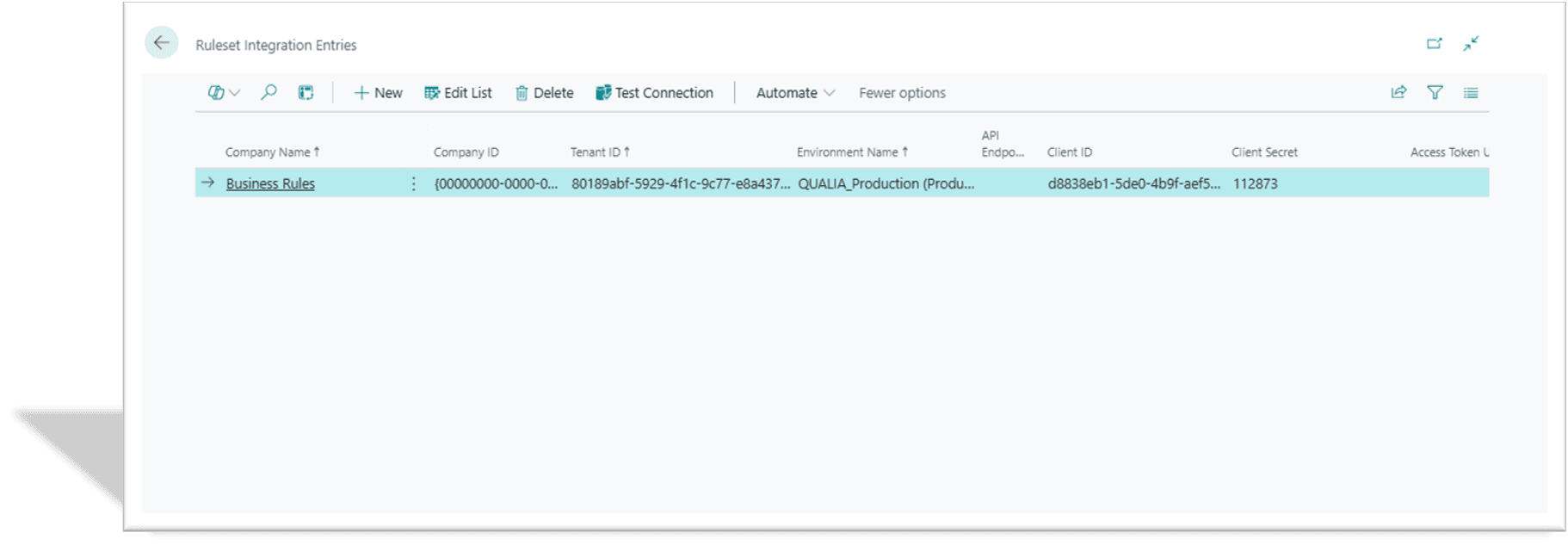
Ruleset Integration Entries: Rules created in a test environment can be deployed to live companies.
The Rule Integration Entries lists companies for Rule Integration
Company Name: Company Name to which user want to move the business rules data.
Company ID: Unique identifier for organization’s Company, used to distinguish it from other business central instances.
Tenant ID: Unique identifier for organization’s environment, used to distinguish it from other business central instances.
Environment Name: An isolated instance of the application, like Production, Sandbox.
API Endpoint: Specific URL that an application programming interface (API) uses to receive requests and provide resources, acting as the entry point for communication between a client and a server.
Client ID: Unique client identifier issued to the client during application registration process.
Client Secret: Unique client secret value issued to the client during application registration process.
Access Token URL: Unique client secret value issued to the client during application registration process.
Access Scope: The scope of the access request.
Test Connection Action Button: This button is used to verify if the connection is established successfully.
Related Content…
>
Introduction
>
Getting Started
>
Business Rules Setup
>
Core Concepts
>
Tutorial: Your First Business Rule
>
Testing and Validation Framework
>
Message Actions
>
Error Message Actions
>
Confirmation Actions
>
Notification Actions
>
Email Actions
>
URL Actions
>
Assign Actions
>
Insert Record Actions
>
Custom Actions
>
Power Automate Actions
>
Action Execution & Sequencing
>
Working with Linked Tables
>
Advanced Formula Building
>
Rule Groups & User Assignment
>
Best Practices & Optimization
>
Troubleshooting Guide
>
Deployment & Change Management
>
Monitoring & Maintenance
>
Placeholder Reference Guide
>
Common Table & Field Reference
>
Formula Operators Reference
>
How to setup Rule Intergration?
>
What are Business Rules?
Related Posts
Formula Operators Reference
This section provides a complete reference of all operators supported in QUALIA Rule Engine formulas.
Common Table & Field Reference
This section provides a quick reference for frequently used Business Central tables and fields in business rules. All table and field IDs have been verified against the system schema.
Placeholder Reference Guide
This section provides a comprehensive reference for all placeholder syntax, operators, functions, and special values supported by QUALIA Rule Engine.
Get Your FREE Dynamics 365 Demo
Transform your business operations with Microsoft Dynamics 365 Business Central
Experience the transformative power of Microsoft Dynamics 365 Business Central for yourself! Request a free demo today and see how our solutions can streamline your operations and drive growth for your business.
Our team will guide you through a personalized demonstration tailored to your specific needs. This draft provides a structured approach to presenting Qualia Tech's offerings related to Microsoft Dynamics 365 Business Central while ensuring that potential customers understand the value proposition clearly.