
0 Code Universal Default Values
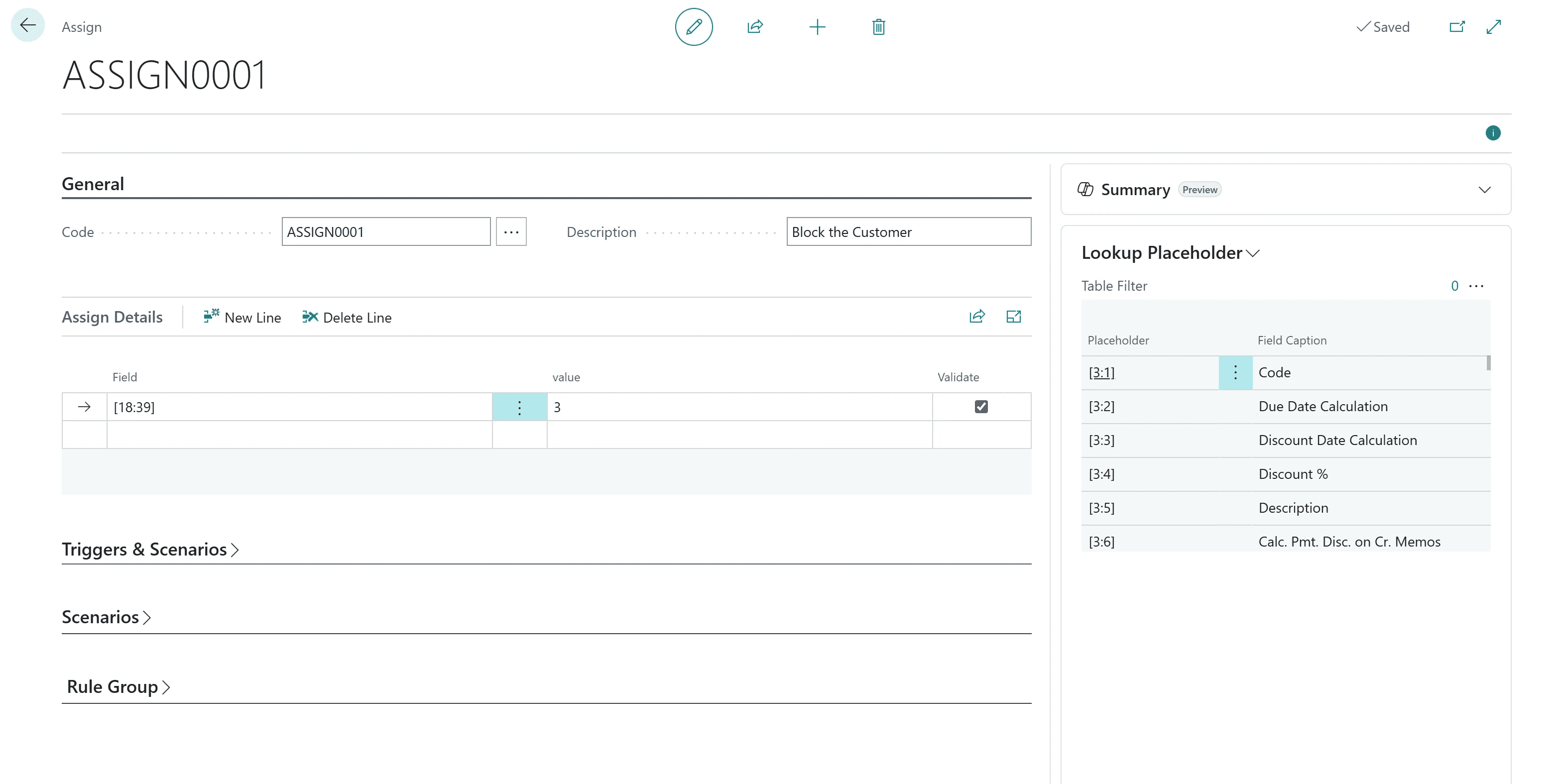
0 Code Universal Default Values helps organizations speed up data entry and maintain consistency across Microsoft Dynamics 365 Business Central—without writing a single line of code. Automatically assign default values or insert related records when creating or updating data, across any module or ISV extension.
What You Can Do
Assign Defaults: Auto-populate fields like Posting Groups, Payment Terms, or Shipment Methods.
Insert Records: Create related lines or master data (e.g., Default Dimensions, Standard Charges, Notes).
Apply Conditions: Trigger only when specific criteria are met (e.g., customer type, document status, amounts).
Why Choose 0 Code Universal Default Values?
Universal Coverage: Works with all BC modules and ISV solutions.
True No-Code: Configure rules through intuitive pages—no AL development needed.
Consistency & Speed: Reduce manual entry and enforce data standards automatically.
Common Use Cases
Customers: Auto-assign Posting Groups, Payment Terms; insert Default Dimensions.
Items: Insert standard Default Dimensions or Unit of Measure lines.
Sales/Purchase Docs: Prefill Shipment Method, Payment Terms; insert Standard Charges or info lines.
Key Features
✔ Insert Action – Auto-create related records with field mapping.
✔ Conditional Rules – Trigger by event and scenario (Insert/Modify/Delete; Before/After).
✔ Dynamic Placeholders – [TableNo:FieldNo], {TableNo:FieldNo}, [USERID], [TODAY], [CDT], and aggregates.
0 Code Universal Default Values helps organizations speed up data entry and maintain consistency across Microsoft Dynamics 365 Business Central—without writing a single line of code. Automatically assign default values or insert related records when creating or updating data, across any module or ISV extension.
What You Can Do
Assign Defaults: Auto-populate fields like Posting Groups, Payment Terms, or Shipment Methods.
Insert Records: Create related lines or master data (e.g., Default Dimensions, Standard Charges, Notes).
Apply Conditions: Trigger only when specific criteria are met (e.g., customer type, document status, amounts).
Why Choose 0 Code Universal Default Values?
Universal Coverage: Works with all BC modules and ISV solutions.
True No-Code: Configure rules through intuitive pages—no AL development needed.
Consistency & Speed: Reduce manual entry and enforce data standards automatically.
Common Use Cases
Customers: Auto-assign Posting Groups, Payment Terms; insert Default Dimensions.
Items: Insert standard Default Dimensions or Unit of Measure lines.
Sales/Purchase Docs: Prefill Shipment Method, Payment Terms; insert Standard Charges or info lines.
Key Features
✔ Insert Action – Auto-create related records with field mapping.
✔ Conditional Rules – Trigger by event and scenario (Insert/Modify/Delete; Before/After).
✔ Dynamic Placeholders – [TableNo:FieldNo], {TableNo:FieldNo}, [USERID], [TODAY], [CDT], and aggregates.
0 Code Universal Default Values helps organizations speed up data entry and maintain consistency across Microsoft Dynamics 365 Business Central—without writing a single line of code. Automatically assign default values or insert related records when creating or updating data, across any module or ISV extension.
What You Can Do
Assign Defaults: Auto-populate fields like Posting Groups, Payment Terms, or Shipment Methods.
Insert Records: Create related lines or master data (e.g., Default Dimensions, Standard Charges, Notes).
Apply Conditions: Trigger only when specific criteria are met (e.g., customer type, document status, amounts).
Why Choose 0 Code Universal Default Values?
Universal Coverage: Works with all BC modules and ISV solutions.
True No-Code: Configure rules through intuitive pages—no AL development needed.
Consistency & Speed: Reduce manual entry and enforce data standards automatically.
Common Use Cases
Customers: Auto-assign Posting Groups, Payment Terms; insert Default Dimensions.
Items: Insert standard Default Dimensions or Unit of Measure lines.
Sales/Purchase Docs: Prefill Shipment Method, Payment Terms; insert Standard Charges or info lines.
Key Features
✔ Insert Action – Auto-create related records with field mapping.
✔ Conditional Rules – Trigger by event and scenario (Insert/Modify/Delete; Before/After).
✔ Dynamic Placeholders – [TableNo:FieldNo], {TableNo:FieldNo}, [USERID], [TODAY], [CDT], and aggregates.
Blog
Explore Industry Insights and ERP Best Practices
Your Trusted Partner in Digital Transformation Your Trusted Partner in Digital Transformation
Our Knowledge Hub articles help you learn all you need to know, to get configured and up and running with D365 Business Central.
Dec 2, 2025
Understanding the Rule Execution Pipeline: From Trigger to Action
Understanding the Rule Execution Pipeline: From Trigger to Action
Understanding the Rule Execution Pipeline: From Trigger to Action
Dec 2, 2025
Energy and Utilities Industry Solutions
Energy and Utilities Industry Solutions
Energy and Utilities Industry Solutions
Dec 2, 2025
Real Estate and Property Management Solutions
Real Estate and Property Management Solutions
Real Estate and Property Management Solutions
Dec 2, 2025
Pharmaceuticals and Life Sciences Solutions
Pharmaceuticals and Life Sciences Solutions
Pharmaceuticals and Life Sciences Solutions
Dec 2, 2025
Non-Profit and Grant Management Solutions
Non-Profit and Grant Management Solutions
Non-Profit and Grant Management Solutions
Get Your FREE Dynamics 365 Demo
Transform your business operations with Microsoft Dynamics 365 Business Central
Experience the transformative power of Microsoft Dynamics 365 Business Central for yourself! Request a free demo today and see how our solutions can streamline your operations and drive growth for your business.
Our team will guide you through a personalized demonstration tailored to your specific needs. This draft provides a structured approach to presenting Qualia Tech's offerings related to Microsoft Dynamics 365 Business Central while ensuring that potential customers understand the value proposition clearly.
Certified partners with
Certified partners with



© 2024 Qualia. All rights reserved
QUALIA Technik GmbH
info@qualiatechnik.de
17, Heinrich-Erpenbach-Str. 50999 Köln
© 2024 Qualia. All rights reserved
QUALIA Technik GmbH
info@qualiatechnik.de
17, Heinrich-Erpenbach-Str. 50999 Köln
© 2024 Qualia. All rights reserved
QUALIA Technik GmbH
info@qualiatechnik.de
17, Heinrich-Erpenbach-Str. 50999 Köln
© 2024 Qualia. All rights reserved
QUALIA Technik GmbH
info@qualiatechnik.de
17, Heinrich-Erpenbach-Str. 50999 Köln